Koodo Community
Solved

Mobile Data is not working, APN appears correct

  • October 9, 2026
  • 9 replies
  • 49 views

Hi,

I’ve noticed that my mobile data doesn’t seem to be working which is a bit alarming considering I’m leaving for Europe in 2 days and just bought the 14 day Europe travel pass.

My data usage is at 1.5 GB/100GB so plenty of data left. My APN is set to “Koodo SP”.

I also got a weird text message when I got the travel pass that said “Koodo: Nice. you have purchased more data to be used until the end of your bill cycle, which ends at 11:59 pm on 2026-10-17-04:00. Your data is no longer paused!”

The apps I’m using to test, AirBnB and FB Messenger are both set to use both Wifi and Mobile.

Can you please help me figure out what’s happening?

Thanks,

Charles

Best answer by Charles Richard

Actually, it’s working now. I switched mobile connections to use LTE instead of 5G, the data was working.

I then switched connections back to 5G and in the about phone SIM card status, Mobile data network type now shows “LTE” instead of “NR NSA”

9 replies

Also the behavior is, when wifi is not available or turned off, the apps just seem to be in a wait state, displaying no data.


Dinh
Forum|alt.badge.img+4
  • Mobile Master
  • October 9, 2026

That "you have purchased more data... your data is no longer paused" text is a known glitch. Reps have confirmed no extra data actually gets added, so you can disregard it.

For the data itself, which phone are you using, and did it stop working right after you bought the travel pass? In Self Serve under Mobile services - Add-ons, check the Europe pass is actually listed there, and look for any data block sitting on the line. Someone else here had a leftover TEST Data Block after a pass was added, and removing it brought their data back https://community.koodomobile.com/plans-add-ons-66722/eu-travel-pass-blocked-due-to-testing-7835967


Restart the phone after that, and reset the network settings as well.


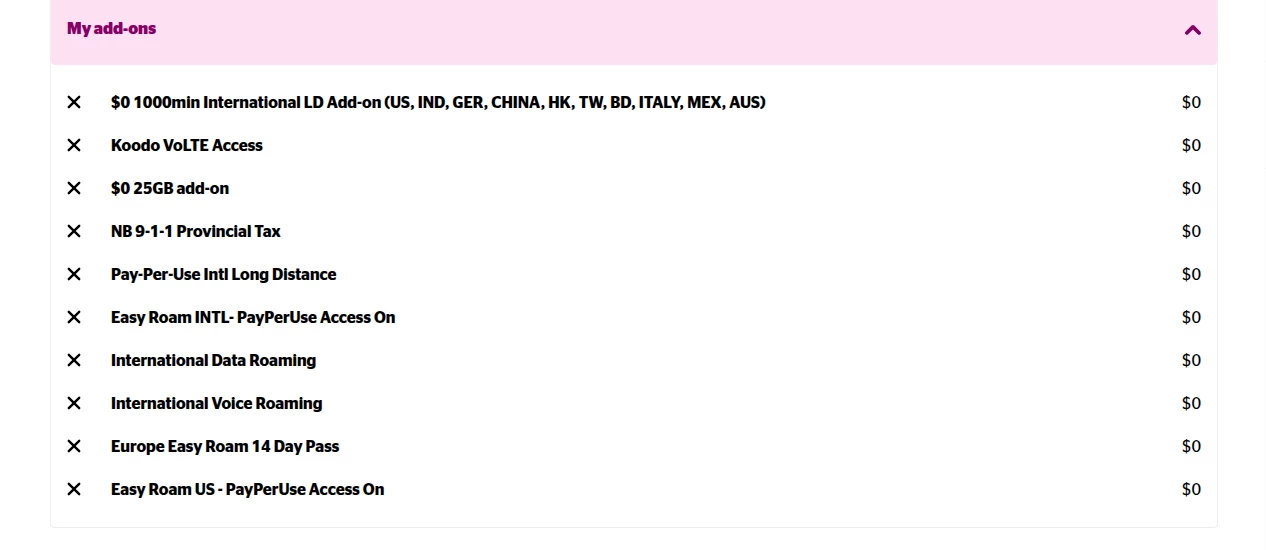
This is what I have in addons below. Should I remove everything Europe and International except the 14 day roam pass?  Also, I’m not 100% but I think this was an issue before I bought the pass, I just didn’t realise it then.

If it makes a difference, I’m using a Koodo eSim instead of a physical sim.


Thanks,

Charles


Oh and I restarted my phone yesterday, after getting the 14 day pass, and that didn’t seem to help.


Forum|alt.badge.img+4
  • Mobile Master
  • October 9, 2026

You do not need to remove anything from your list of add-ons. Everything is showing up correctly.

Did you enable data roaming on your phone? Have you toggled off airplane mode? What about manually selecting a network to see if it works? https://www.koodomobile.com/en/help/set-up-and-tips-for-traveling-with-your-mobile-device

With regards to the text message, I have also flagged a rep to confirm this for you.


Ok, I think I see a discrepancy but I don’t understand why:

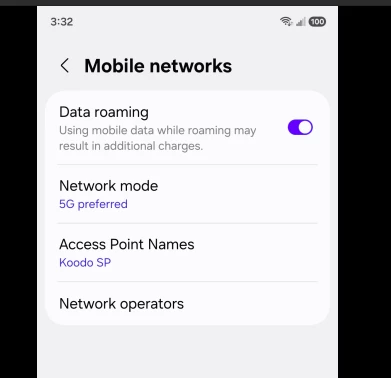
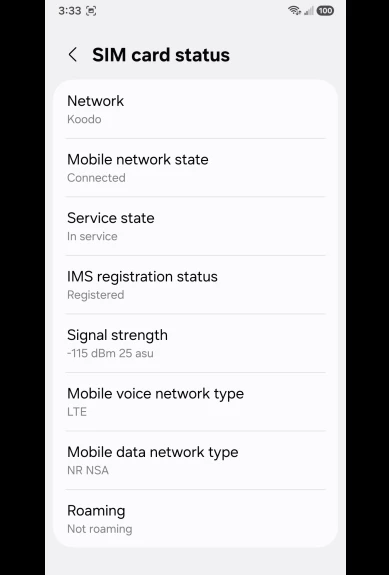
See 2 attached screenshots, data roaming is on but in “About phone”, roaming is off?


The last reply was supposed to have 2 screenshots, here’s the 2nd one that I think might be problematic:


  • Author
  • Rockstar
  • Answer
  • October 9, 2026

Actually, it’s working now. I switched mobile connections to use LTE instead of 5G, the data was working.

I then switched connections back to 5G and in the about phone SIM card status, Mobile data network type now shows “LTE” instead of “NR NSA”


Koodo
Forum|alt.badge.img+4
  • Official Rep
  • October 9, 2026

Hi ​@Charles Richard, we’ve checked the account as well, everything is looking normal for the data provisioning, we’re not seeing any issues. The travel pass was added successfully, the message is just a glitch as Dinh mentioned above. We hope you have a great trip!