Koodo Community
Question

IPhone 15 - System Services (Software Updates) using 93% of cell data

  • June 19, 2025
  • 12 replies
  • 308 views

Have spent 2 hours with Apple and with 2 different Advisors over 2 days via telephone and they have made sure that my settings are fine. I never have Software update automatically but Cellular Data, System Services say Software Data is sucking up my data. Diagnostics indicate that my phone is in excellent shape. They made an appointment for me with the Genius Bar who I am sure will ask if I talked to Koodo. Apple says they don’t have any other callers having this issue. I blew through 500 MG of a 4 GB plan in less than 2 hours yesterday, Day 3 of this period. Last month, I barely made it under 4 GB.  Normally, I use between 250 and 500 MB per month. 
 

Any suggestions? Thanks, Lin

This topic has been closed for replies.

12 replies

Forum|alt.badge.img+4
  • Mobile Master
  • June 19, 2025

You mentioned turning off automatic updates. Are you also able to select update only when connected to wifi? Do you also have wifi-assist disabled?


  • Author
  • Organizer
  • June 19, 2025

Wifi assist is disabled. Phone only updates when on wifi.  
thank you! 


Forum|alt.badge.img+4
  • Mobile Master
  • June 19, 2025

So you’ve had it set to update only on wifi and then it sitll uses data as you descibed originally?


  • Author
  • Organizer
  • June 20, 2025

Yes. It still updates when I have Software Update set to only occur when on Wifi which is how I have always had it. I already had the latest version of IOS (updated mid-May). Apple says some cell data is required to complete the full update. But this is June 19, a month later.

I just got back from the Genius Bar. The advisor is saying this is normal and to keep an eye on it for the next 3 days. If it is still sucking data, then we can wipe out the whole phone and re-install the software and start new (meaning no restoring from backup). He doesn’t think things will change because a “base” amount is needed to run my phone. He said his Systems Services is 6 GB out of 20 GB. I have been an iPhone user for over 10 years and used between 250 and 500 MB/month, never going beyond 1 MB even though I pay for 4 GB so this is my not normal. 

thank you, Lin 


Dinh
Forum|alt.badge.img+4
  • Mobile Master
  • June 20, 2025

If possible, can you share a screenshot where it showed  System Services consumed your data? If I recalled correctly, iMessage and iCloud data is also part of that as well. 


  • Author
  • Organizer
  • June 20, 2025

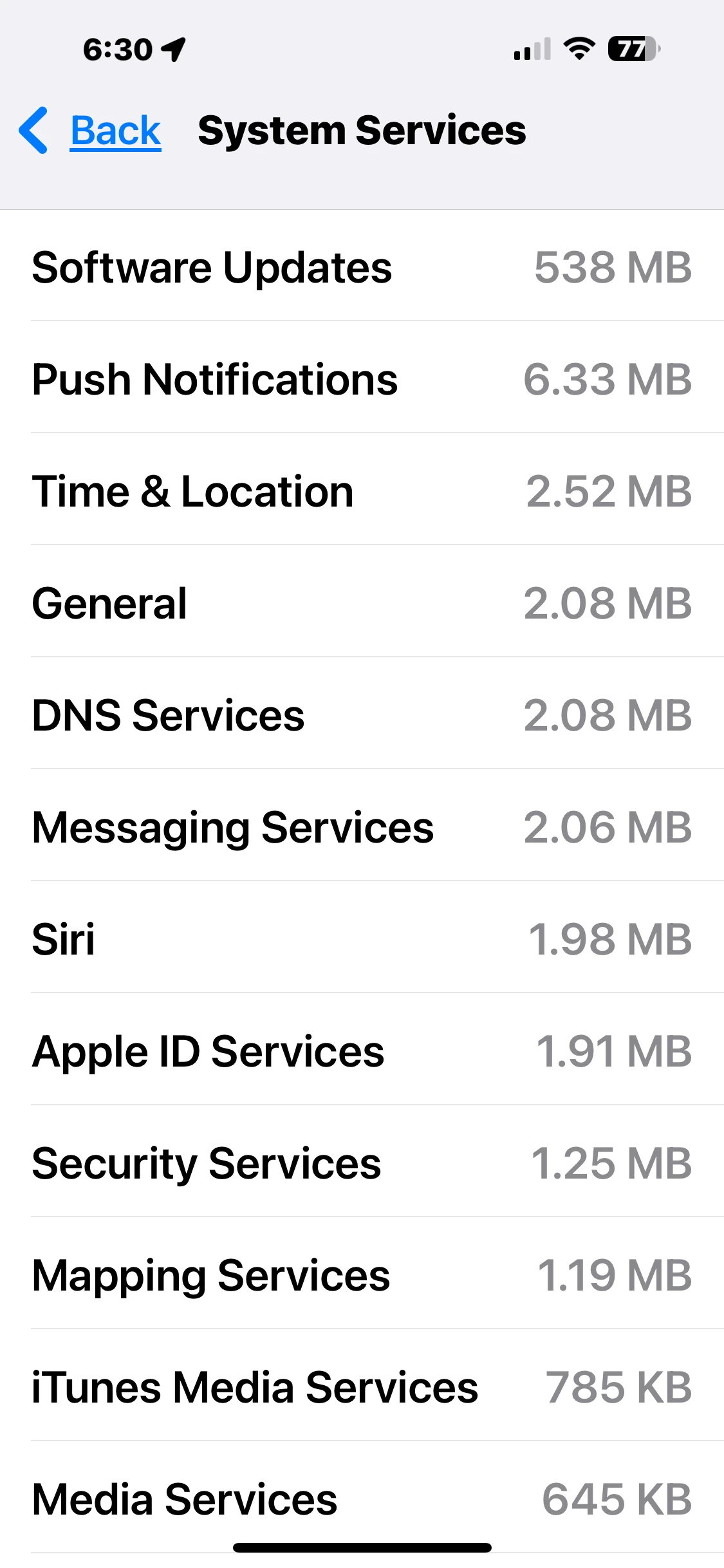
Hi Dihn, I took this last night. This is out of 562 mb for System Services. Thanks, Lin


Forum|alt.badge.img+4
  • Mobile Master
  • June 20, 2025

Does it differentiate between iOS updates and App updates?  Are you able to cliock on Software updates and see if it provides more info?

Does it show which app this is happening with?


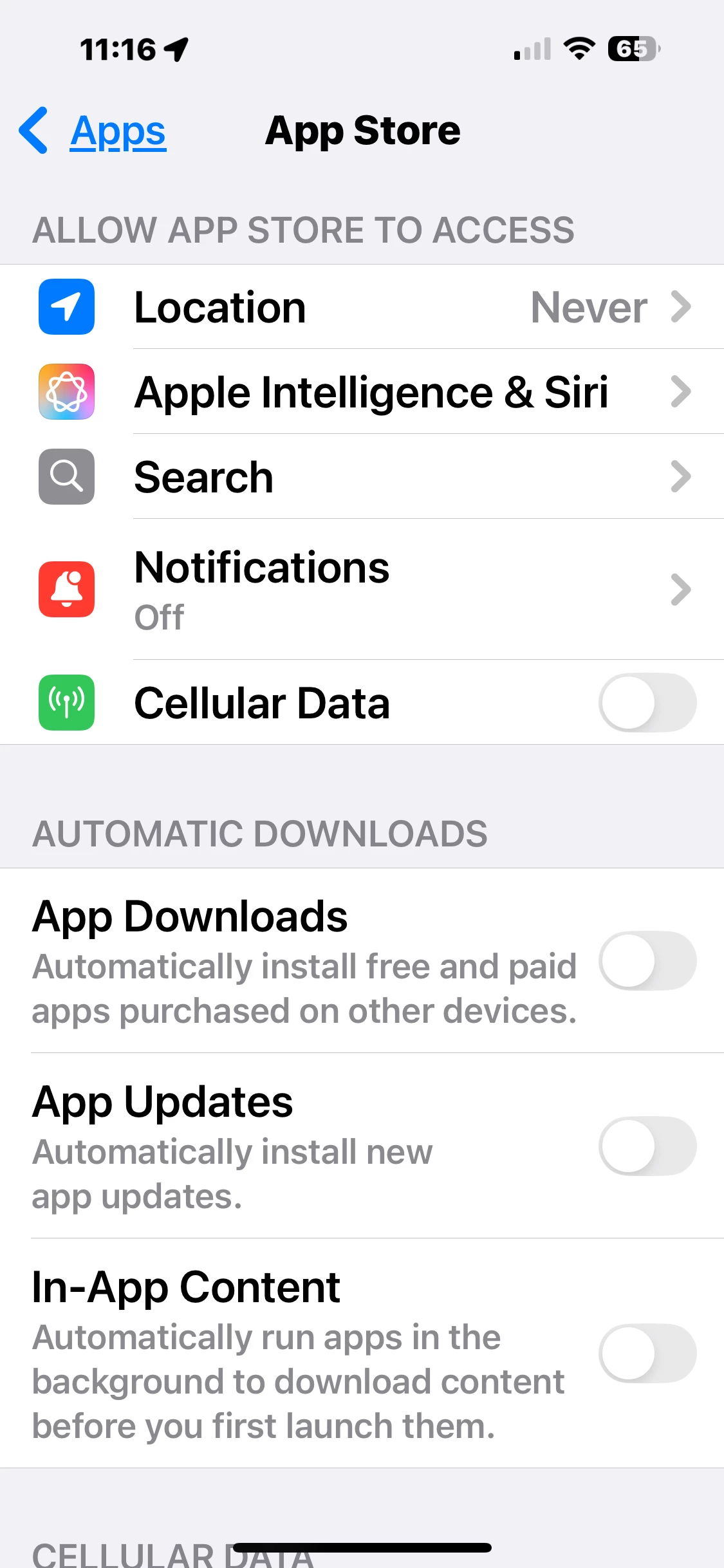
Can you show a screenshot where app automatic updates are shown to be turned off? And updates are only via wifi?

If automatic updates are off, can you find out which apps still need updates (these apps should be good since they still need updates).  But from this you can try to find the app that doesnt need updates.  There might be a rogue app that is breaking protocol and updating without your permission.

Since you use so little data, you can also turn off data use for these specific apps to narrow down this possible rogue app


  • Author
  • Organizer
  • June 21, 2025

Hi Dennis: Under Settings, Cellular, System Services, there is no differentiation between IOS updates or App Updates for “Software Updates”. I also confirm that automatic App Updates for the App Store are turned off.


  • Author
  • Organizer
  • June 21, 2025

Dennis, I went to the App Store and see that updates are required for 24 apps and they are from June 7 to 20 yesterday. It was June 18 that the Software Updates increased 539 mb and no app updates occurred on that date.  
I do have very few apps that are turned on for Cellular data. The two major ones are Apple Maps and Google Maps. When the 539 mb, occurred and increased Software Updates under System Services (for Cellular data), I used Google Maps for about 15 minutes. but Google Maps only increased to 15.5. I did not record the screenshot but it would have been under 4.49 because it was below that of Apple MAPS.

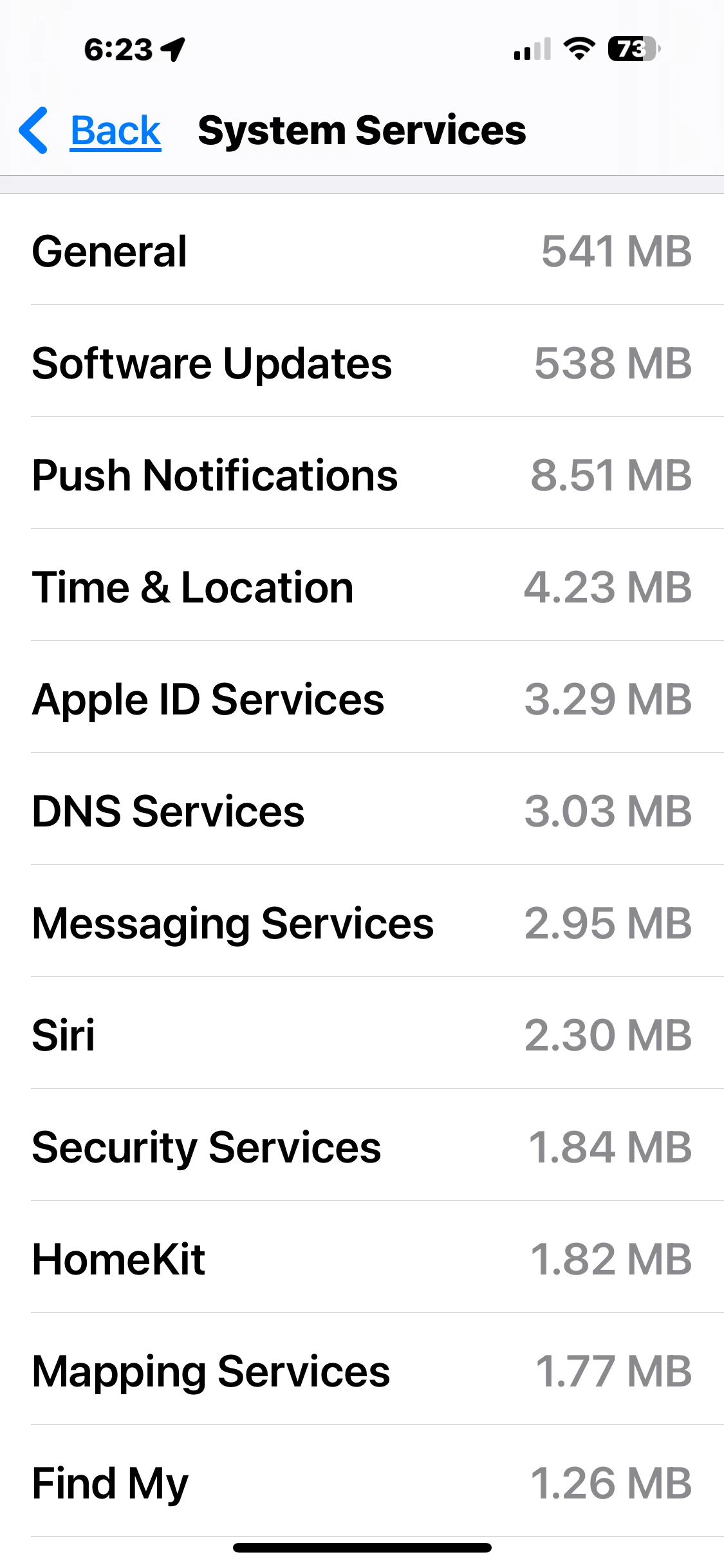
Today (June 20], I used my Apple Watch to record my 2 hour Outdoor walk. Google Maps on my iPhone was turned off but MAPS was on but there was no mb increase. HOWEVER, my System Services increased to 1090 mb, Software Updates remained at 538 but now there is a brand new category “General” which has appeared, 541 mb.

i have used 1.09 GB of my 4.0 GB plan, 5 days into this cycle. This is not normal.
 

I appreciate everyone who has given suggestions. I will call Apple Support again before I go in and have my phone software reinstalled.

many thanks,

Lin


Dinh
Forum|alt.badge.img+4
  • Mobile Master
  • June 21, 2025

It was likely the iCloud sync. Do you have automatic backup on?  as well, are you using a lot of apple photos and document sharing app? 


  • Author
  • Organizer
  • June 21, 2025

Hello Dihn: no syncing over ICloud when using Cellular and I don’t share any photos or documents. I have Family Sharing on but don’t share my ICloud data and they live out of town. 
 

Lin


Dinh
Forum|alt.badge.img+4
  • Mobile Master
  • June 21, 2025

Hello Dihn: no syncing over ICloud when using Cellular and I don’t share any photos or documents. I have Family Sharing on but don’t share my ICloud data and they live out of town. 
 

Lin

Eh, that is strange. Can you do a reset of “reset statistic” in the cellular settings? I wonder if Apple reported wrongly itself there. As well, how much cellular data you have used for the last few days in Koodo self-serve?