Koodo Community
Question

Esim led to my account being unlinked

  • April 13, 2026
  • 9 replies
  • 51 views

Hi guys, so i am currently out of country without my physical Sim card, so I went to the website to get an esim, at first it worked and the esim is currently in my phone, but then after this by like 5 10mins I recieved an email saying my account was unlinked and now I cannot even sign into my self serve as it says my account doesnt exist anymore. Moreover now my esim does not work as it says "sim card not provisioned". 

Id really appreciate some help as I do not come to canada for a few more weeks, would like to gain access to my account again and hopefully have the Sim card working too.


9 replies

Forum|alt.badge.img+4
  • Mobile Master
  • April 13, 2026

How did you get the esim? 

How did you set it up?

Did you create a new account for the esim or did you transfer from your number from your exisiting physical sim to your new esim? 


  • Author
  • Connector
  • April 13, 2026

So I had logged in to my account, then just clicked on set up lost esim, i followed the steps and that was all. I did not create a new account for the esim, my physical Sim card is in another country and I had forgotten to bring it with me hence why I believed just going on self serve to get an esim would be easier. I am unsure what to do now 


Flo Koodo
Forum|alt.badge.img+4
  • Official Rep
  • April 13, 2026

Hi ​@Hassan Issa 

Just to double check, it is a postpaid account that you have, and not a prepaid one, is that right?


Forum|alt.badge.img+4
  • Mobile Master
  • April 13, 2026

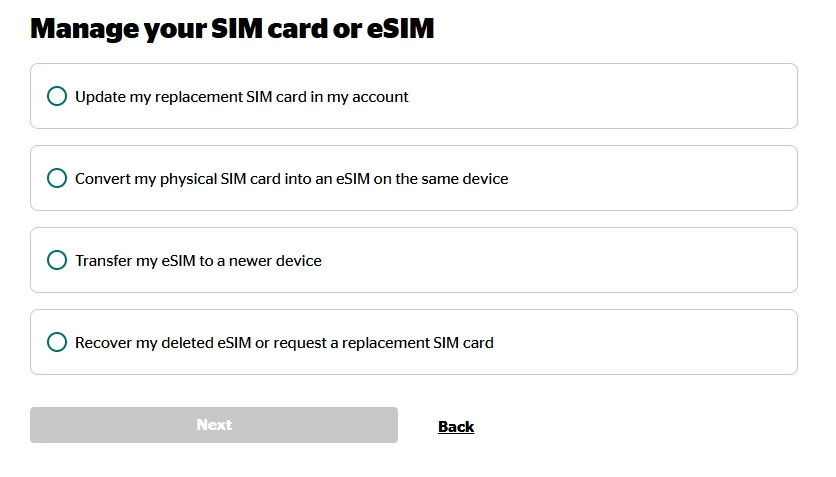
So I had logged in to my account, then just clicked on set up lost esim, i followed the steps and that was all. 

Where do you see that option?

I only see this when i click “Get Help with SIM Cards and eSIMs”.  When I click “Report Lost or stolen phone”, it only takes me to Koodo assist


  • Author
  • Connector
  • April 13, 2026

Hi ​@Hassan Issa 

Just to double check, it is a postpaid account that you have, and not a prepaid one, is that right?

Correct, I have a postpaid account. Would really appreciate your help regarding this as when I land in Canada i would need access to my Sim card as I dont even have access to my account anymore. Id just like it linked back and of course having my esim work. Please let me know if i should send you the email and perhaps you guys can just reverse it? Note it isnt the email i am currently messaging from


  • Author
  • Connector
  • April 13, 2026

So I had logged in to my account, then just clicked on set up lost esim, i followed the steps and that was all. 

Where do you see that option?

I only see this when i click “Get Help with SIM Cards and eSIMs”.  When I click “Report Lost or stolen phone”, it only takes me to Koodo assist


I actually clicked on transfer my esim to a newer device, it downloaded and it actually worked at first, then i turned it off and then on and it stopped working


Forum|alt.badge.img+4
  • Mobile Master
  • April 13, 2026

That’s because you didnt have an exisiting esim on a previous device.

So since there was nothing to transfer, it may have created a new account and this clearly messed up your account.

Let me flag a rep for you again to see if they can fix this.  But it will be a challenge since you lost your self serve account so it will be difficult


  • Author
  • Connector
  • April 13, 2026

That’s because you didnt have an exisiting esim on a previous device.

So since there was nothing to transfer, it may have created a new account and this clearly messed up your account.

Let me flag a rep for you again to see if they can fix this.  But it will be a challenge since you lost your self serve account so it will be difficult

Oh dam, yes please that would be great 😭 your help is much appreciated here


Flo Koodo
Forum|alt.badge.img+4
  • Official Rep
  • April 13, 2026

Hi ​@Hassan Issa 

Unfortunately, we have limited access here on the community since you no longer have access to self serve. We have sent you a PM to confirm some more details and see if there is any way we can guide you from our end. Please check your community inbox when you get the chance.