Koodo Community
Question

didnt receive esim qr code

  • September 18, 2026
  • 14 replies
  • 74 views

I tried to transfer my esim to my other phone it's a Samsung note20 ultra it didn't prompt my phone when I transferred esim I didn't get a QR code either

14 replies

Forum|alt.badge.img+4
  • Mobile Master
  • September 18, 2026

Hi there,

to confirm, how did you attempt to transfer your eSIM? Was it through the Samsung device setup process or was it through Koodo self serve?

If you performed the eSIM recovery through self serve and put in the new device IMEI, did you make sure that the new phone is connected to WiFi? As this is required to receive the eSIM profile via the push notification, note that through this method you do not receive a QR code but only the push notification for the eSIM.

Based on your description, it seems like you’re an existing customer and if so, that is the case. With new customers upon initial setup, it is possible for a rep to send an eSIM QR code for activation. 


  • Author
  • Connector
  • September 18, 2026

Thru the self serve option 


  • Author
  • Connector
  • September 18, 2026

Yes it was connected to wifi 


Forum|alt.badge.img+4
  • Mobile Master
  • September 18, 2026

Ok, and when prompted to insert the device IMEI, did you input the new device (note 20 ultra) as opposed to your existing one?


  • Author
  • Connector
  • September 18, 2026

It told me to put in the eid not a IMEI I was putting my current esim from my google pixel 10 pro onto the Samsung ultra note 20 but I just want to cancel the whole process and keep my esim on my google pixel phone 


Forum|alt.badge.img+4
  • Mobile Master
  • September 18, 2026

Ah ok, when it asks for the device eid (or sometimes IMEI), it is asking for which device to send the eSIM too though the wording isn’t great. So where you inputted the same eid as your pixel device, it would not send the eSIM profile to your note 20 ultra. It would attempt to send it to your pixel but deactivates the current profile.

Is your pixel 10 showing that you still have service or did you receive the eSIM push notification on there? As you should have received it after you completed the eSIM replacement in self serve. If you don’t have service and received the notification, you can remove your now deactivated eSIM from the pixel 10, select the eSIM notification, and re add the profile. 


  • Author
  • Connector
  • September 18, 2026

No I added my note20's eid 


  • Author
  • Connector
  • September 18, 2026

Ya I have no service on the pixel now 


Forum|alt.badge.img+4
  • Mobile Master
  • September 18, 2026

ok, in that case, to send the eSIM back to the Google Pixel, you need to re-do the eSIM recovery within Koodo self serve like you had done originally for the Note 20. When prompted for the device EID, put in your Google Pixel 10’s EID instead. This will prompt Koodo self serve to send the eSIM profile to the Pixel 10 through the push notification method.

Note: If you still have an eSIM for Koodo in the Pixel 10’s settings (the old eSIM) you need to delete it before sending it a new one. Make sure to do this first. Same as I mentioned earlier, make sure the Pixel 10 is connected to Wi-Fi to receive the eSIM.


  • Author
  • Connector
  • September 18, 2026

What the link to the swapping I can't even find it anymore 


Forum|alt.badge.img+4
  • Mobile Master
  • September 18, 2026

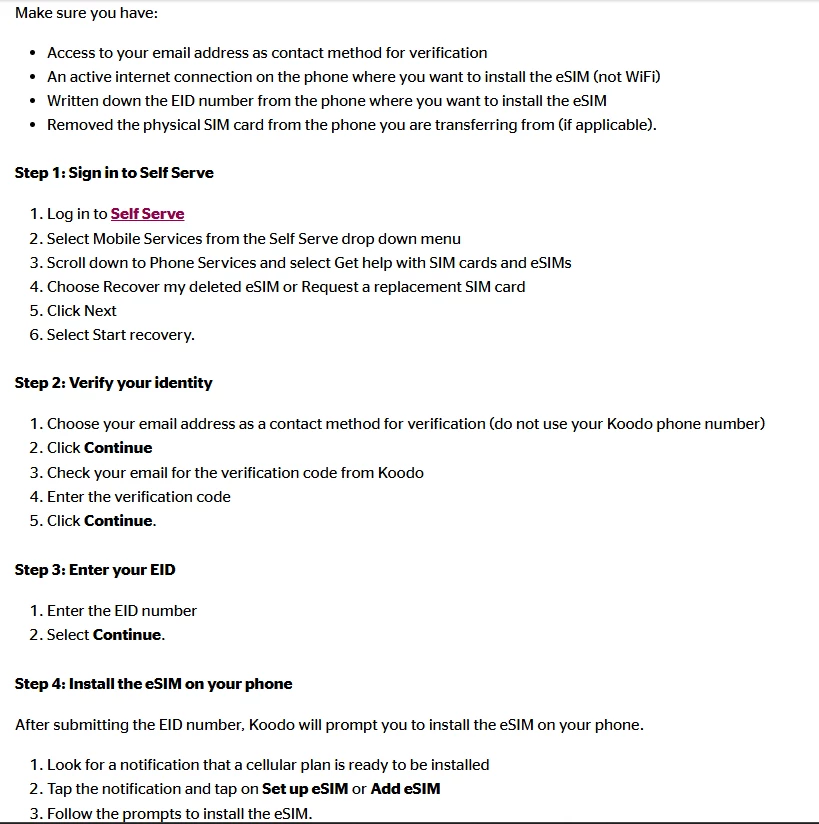
Sure, you can find the section to swap/recover an eSIM through your Koodo self-serve by following these steps.

login to your Koodo self serve account → select the profile icon in the top right → from the drop down menu you are presented after selecting the profile icon choose “Mobile Services” → once selected, scroll down to where it says “get help with SIM cards and esims”.

from there, self serve will walk you through the eSIM recovery process after you select the eSIM recovery option from the list you’re presented. More info can be found here: https://www.koodomobile.com/en/help/esim-on-android


Forum|alt.badge.img+4
  • Mobile Master
  • September 18, 2026

  • Author
  • Connector
  • September 18, 2026

Got it thank you very much 


Forum|alt.badge.img+4
  • Mobile Master
  • September 18, 2026

Got it thank you very much 

No problem, if you run into any other problems, feel free to ask for help on the community again. Enjoy your weekend!