Koodo Community
Question

Set time for voicemail to pick up incoming call

  • January 15, 2026
  • 13 replies
  • 70 views

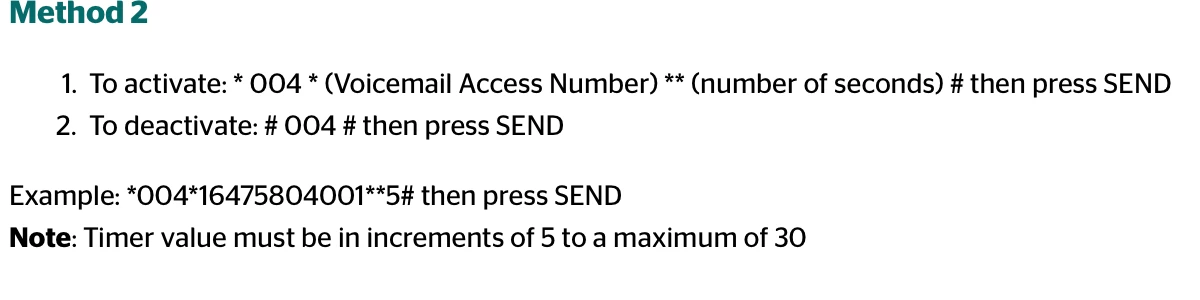
Samsung Galaxy A34 5G. I have tried dialing the following 3 ways that I have learned from this Community:  *61*voicemail access number here**15#   and   *61*voicemail access number here*11*15#  and   **61*voicemail access number here*11*15# wanting to set up 15 seconds before voicemail pick up a call but none of these worked. I recently transferred my phone number from a prepaid plan to a $35 monthly postpaid plan. Does my current plan allowed me to use this feature? If yes, could you please help me to do it?

13 replies

Forum|alt.badge.img+4
  • Mobile Master
  • January 15, 2026

Try *61*+1647580400115# (use your actual 10-digit number instead of 6475804001). Dial exactly like that from your phone app, then hit call. All Koodo postpaid plans support call forwarding/voicemail timing.

To verify: Dial ##61# and call to check status.

If it fails, restart phone, ensure no VPN on, or test Airplane mode off. Let me know what error shows! 


  • Author
  • Advisor
  • January 15, 2026

Robert T. Thank you for your prompt response. Sorry I couldn't reply to you sooner.

I tried what you advised in your email using my phone number, with and without the +1 in front, instead of the Voicemail Access Number, but it did not work.

I also tried the formats 1 and 2 indicated in my posted message above using my phone number instead of the Voicemail Access Number and none worked. 

Any other suggestion?


  • Author
  • Advisor
  • January 15, 2026

Robert T. In all the actions I received a message saying “Call forwarding when no reply for all speech services, connection problem or invalid MMIj code”.

After all the trials were done I dialed ##61# and received the message “Call forwarding when no reply Erasure was successful”. It looks like this code cleared the last *61* action that I did.


  • Author
  • Advisor
  • January 15, 2026

Robert T. Tried unsuccessfully restarting the phone, with Airplane mode Off and no VPN.


Forum|alt.badge.img+4
  • Mobile Master
  • January 15, 2026

Are you able to make regular calls?  Like do you have a good cellular network connection?


Also are you using the Voicemail Access Number that is assigned to you?  You can check your voicemail access number by dialing *#61# and then call.


  • Author
  • Advisor
  • January 15, 2026

Hi Dennis. Thank you for your reply. Yes, I can make regular calls and having a good cellular connection.

I dialed *#61# and a message came out that reads “Call forwarding when no reply”

followed by “Not forwarded” for each one of the following items: Voice, Data, FAX, SMS, Sync, Async, Packet, PAD.


  • Author
  • Advisor
  • January 15, 2026

Dennis. I forgot to tell that the Voicemail Access Number was not shown.


Darius Koodo
Forum|alt.badge.img+4
  • Official Rep
  • January 15, 2026

Hi there ​@mchan  you can try to long press the number 1 on your phone and it should automatically call your voicemail, it will show the voicemail access number at the top if you keep the screen visible. You can check the number and even take a print screen to save it. 

I will also include a helpful page with voicemail access numbers based on area code. If it was not changed in the past for you, it should be the same. 


  • Advocate
  • January 16, 2026

This method worked for me.


  • Author
  • Advisor
  • January 16, 2026

Hi Darius. As per your instruction I went to voicemail by long pressing on number 1 on the keypad of the Phone app, the Voicemail Access Number was shown for an instant when I ended the call; the number is the same shown for my area code on the list reached through the link on your message. Yesterday I made several attemps with 4 different formats of *61*, on each attemp I received a message that indicated that the action was completed, no error mentioned, but the number of rings to activate voicemail did not change when I called my celluler phone from my home phone. I welcome any other tips that you could give me.


  • Author
  • Advisor
  • January 16, 2026

Hi chilco. Thank you for the response. Unfortunately, this did not work for me, I tried it with and without the number 1 in front of the Voicemail Access Number and neither way worked.


  • Advocate
  • January 16, 2026

2 years ago a tutorial on changing the number of rings for voicemail stated that Samsung phones do not support call forward variable. I don’t know if that is still the case today.


Compatibility

  • This is not compatible with Smart Hubs, including Wireless Home Phone devices.
  • Samsung phones do not support Call Forward Variable.

  • Author
  • Advisor
  • January 16, 2026

Hi Chilco. Thank you for this information, at least this explains why the tips that I got from members of this community could not solve my problem with this matter.