Koodo Community
Question

How to activate Amazon Prime via Stream+ Premium

  • August 13, 2026
  • 11 replies
  • 73 views

I’m in a bit of a pickle.

I subscribed to Stream+ back in Sept 2024. Activated all the services, everything was good. Fast forward to Sept 2025 and Amazon sends me an email saying I need to pay for Amazon Prime. Not thinking, I cancel Prime and go about my life. 

Went to order something off of Amazon last week and there was a deal that was for Prime members only. Then I went down a rabbit hole where I realized that my Amazon Prime subscription isn’t active anymore even though I still pay for Stream+ Premium. Nobody at Koodo seems to know how to fix this except to cancel my current Stream+ subscription then add it back on again because they can’t re-send the activation link.

Is this the only way to fix this? or does anyone know how I can link the two services again?

11 replies

Forum|alt.badge.img+4
  • Mobile Master
  • August 13, 2026

Hi again ​@Machzy !

That depends. When you go to your subscription page in Koodo self-serve, you should see your stream+ subscription. Within it, you should see Netflix, Disney+ and amazon prime. Next to the subscription, it will say “Linked” or “activate”. When you view this, does it say “activate” next to amazon prime or “Linked”

If it says activate, you can click the box, and it will walk you through the activation process of the subscription. If it says linked, I suggest you fill out this form made by Telus and they can investigate. This form is for both Telus and Koodo customers. In the description, explain your situation that you need a new activation link for Amazon prime. A rep will then investigate the issue. Let us know if you run into any problems with either option. Customer Support Ticket Form | TELUS

If neither work, let us know and we can have a rep here investigate as well. The previous reps you dealt with are not wrong though, one of the solutions to this issue is to cancel stream+, wait until the end of the current subscription cycle, and then add it again. 🙂


Dinh
Forum|alt.badge.img+4
  • Mobile Master
  • August 13, 2026

Cancelling and re-adding isn't necessarily the only route. The activation isn't tied to that email, it is in Self Serve under Subscriptions, so log in there first and see whether Amazon still shows an activate option.

If the button does nothing or the page comes up empty that's usually the page failing to load its data, you can try a different browser or device and also turn off the pop-up blocker.

If it does send you over to Amazon and you get the "you already have an active Prime membership" error, that one has to be handled on Amazon's side before the link will complete. https://www.koodomobile.com/en/help/stream-plus


  • Author
  • Connector
  • August 13, 2026

Hi again ​@Machzy !

That depends. When you go to your subscription page in Koodo self-serve, you should see your stream+ subscription. Within it, you should see Netflix, Disney+ and amazon prime. Next to the subscription, it will say “Linked” or “activate”. When you view this, does it say “activate” next to amazon prime or “Linked”

If it says activate, you can click the box, and it will walk you through the activation process of the subscription. If it says linked, I suggest you fill out this form made by Telus and they can investigate. This form is for both Telus and Koodo customers. In the description, explain your situation that you need a new activation link for Amazon prime. A rep will then investigate the issue. Customer Support Ticket Form | TELUS

If this does not work, let us know and we can have a rep here investigate as well. The previous reps you dealt with are not wrong though, one of the solutions to this issue is to cancel stream+, wait until the end of the current subscription cycle, and then add it again. 🙂


I don’t see Netflix, Disney+, or Amazon Prime.


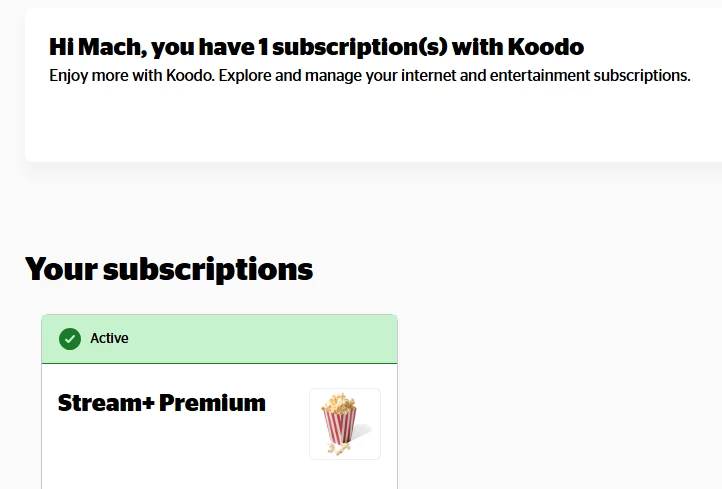
When I go into my Subscriptions, I see this:


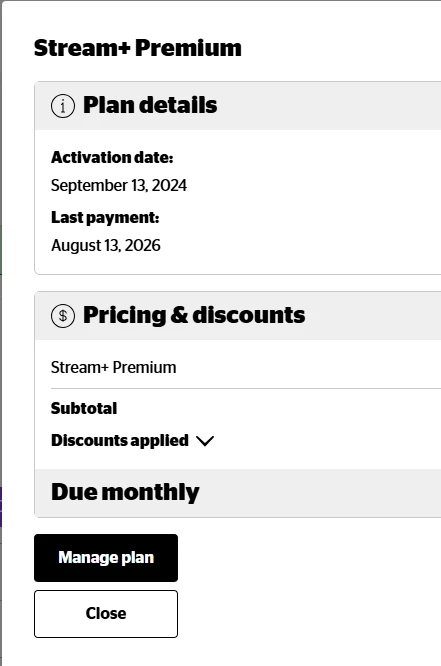
Then when I click on View Details, I see this:


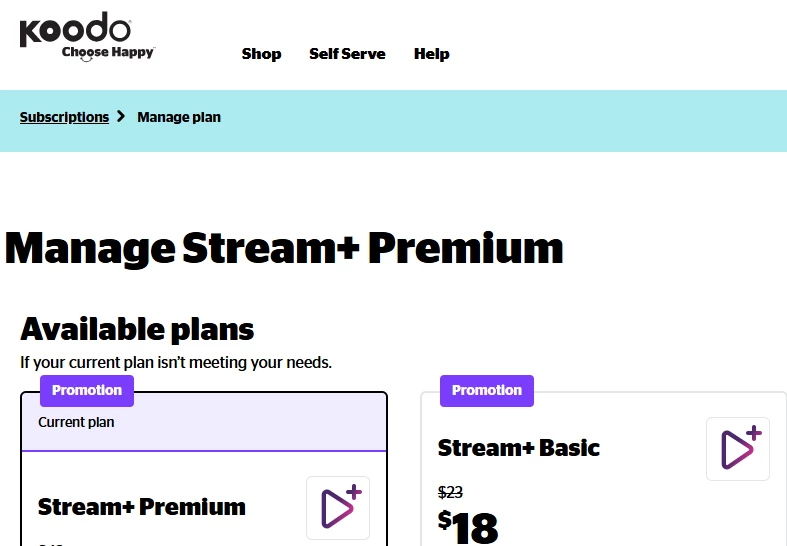
When I click on Manage Plan, I see this:


All that it allows me to do is Switch to Basic.


  • Author
  • Connector
  • August 13, 2026

Cancelling and re-adding isn't necessarily the only route. The activation isn't tied to that email, it is in Self Serve under Subscriptions, so log in there first and see whether Amazon still shows an activate option.

If the button does nothing or the page comes up empty that's usually the page failing to load its data, you can try a different browser or device and also turn off the pop-up blocker.

If it does send you over to Amazon and you get the "you already have an active Prime membership" error, that one has to be handled on Amazon's side before the link will complete. https://www.koodomobile.com/en/help/stream-plus


Tried on desktop: Edge & Chrome without ads. I don’t see Amazon listed there as Active or Linked.


I also tried on my mobile and the same thing shows up there as desktop. (see my other reply for screenshots)


Forum|alt.badge.img+4
  • Mobile Master
  • August 13, 2026

I actually don’t see any options other than what you have either. Would you like to pursue the option of flagging a rep here to look into it separately before opting fort the cancel route? 


Forum|alt.badge.img+4
  • Mobile Master
  • August 13, 2026

hmm ok, I just checked on mine as well and it seems it is the same.

When you sign up for the services, the “Activate services” option will appear. From there, it will present you with the options I had described. Where yours and mine were both activated fully in the past, it seems that the feature goes away as the services are supposedly linked. This is good to know for us on the page going forward. Apologies for the misdirection.

I would still reach out via the form I provided earlier so that Koodo can try to send you a new activation email. If you would like, I can also flag a rep to pursue this further, but beyond that the only remaining option would be to remove the subscription like the previous CS reps had suggested.


  • Author
  • Connector
  • August 13, 2026

hmm ok, I just checked on mine as well and it seems it is the same.

When you sign up for the services, the “Activate services” option will appear. From there, it will present you with the options I had described. Where yours and mine were both activated fully in the past, it seems that the feature goes away as the services are supposedly linked. This is good to know for us on the page going forward.

I would still reach out via the form I provided earlier so that Koodo can try to send you a new activation email. If you would like, I can also flag a rep to pursue this further, but beyond that the only remaining option would be to remove the subscription like the previous CS reps had suggested.


Yes, please flag a rep. I’ve talked to them already and they said they can’t resend activation links. But I’d like to try again if that’s okay. 
 

Thanks!


Forum|alt.badge.img+4
  • Mobile Master
  • August 13, 2026

Ok, no problem I will give them a nudge. 🙂

Make sure you’re logged into the community using your self-serve credentials and they can investigate. Note that response times on the community can vary, however, a rep will always respond. 👍


Koodo
Forum|alt.badge.img+4
  • Official Rep
  • August 13, 2026

Hi ​@Machzy, unfortunately, we can’t resend the activation links manually. They are sent automatically when you purchase the service. If you’d like to re-link/reactivate the Amazon Prime subscription you’d have to cancel the service, wait until the subscriptions expire after your current bill cycle ends and sign up again. 

Of course, you can also try the form linked above to check if the dedicated Stream+ team has any other options but it’s possible they will suggest the same thing. 


  • Author
  • Connector
  • August 13, 2026

Hi ​@Machzy, unfortunately, we can’t resend the activation links manually. They are sent automatically when you purchase the service. If you’d like to re-link/reactivate the Amazon Prime subscription you’d have to cancel the service, wait until the subscriptions expire after your current bill cycle ends and sign up again. 

Of course, you can also try the form linked above to check if the dedicated Stream+ team has any other options but it’s possible they will suggest the same thing. 


I’ll try that, but is there any way that Koodo can honor my current promo pricing?


Koodo
Forum|alt.badge.img+4
  • Official Rep
  • August 13, 2026

The re-activation would be for the current in-market price. However, I did reach out to the Stream+ team to check if they had other suggestions we could try before that. They confirmed you should fill out the contact form with all the details for this issue, and they will try to reboot only the Amazon Prime subscription for you.