Koodo Community
Solved

Cannot set-up wi-fi

  • March 22, 2026
  • 7 replies
  • 58 views

I am attempting to set-up wi-fi calling but am not able.

 - I have a Galaxy S23 FE on a monthly plan

 - the “wi-fi calling” toggle is not visible in the settings menu on my phone

 - the “VoLTE” add-on is not visible in either “My add-ons” or “Add-ons available for you” selections of the Mobile Services menu on the Self Serve page.

 - entering VoLTE in the search yields no answer.  I am instructed to re-phrase my questions.  I have also tried “wifi calling”, “wi-fi calling”. “wi-fi call”, “wifi call” and continue to get the same non-answer.


I someone able to instruct me on what needs to be done to rectify this problem?

Thank you!

Best answer by Dinh

That is strange. What did you see when you open the phone app  → Select the “tri dot” on the top right of the dial pad → Settings → Did you see the Wi-Fi calling option there? 

If it is not there, can you quickly grab a snapshot of it and post it here? Hide all personal information before posting please.

7 replies

Dinh
Forum|alt.badge.img+4
  • Mobile Master
  • March 22, 2026

VoLTE provision is embedded in carrier settings and you don't have to add it. It is already there from Koodo end.

Regarding your WiFi calling settings, is the phone purchased from Koodo? And currently do you have Koodo cellular signal in your area?


  • Author
  • Connector
  • March 22, 2026

Yes and yes.  

The phone was purchased from Koodo.  According to the “about phone” info in the settings menu, the network is Koodo.

Thank you


Dinh
Forum|alt.badge.img+4
  • Mobile Master
  • Answer
  • March 22, 2026

That is strange. What did you see when you open the phone app  → Select the “tri dot” on the top right of the dial pad → Settings → Did you see the Wi-Fi calling option there? 

If it is not there, can you quickly grab a snapshot of it and post it here? Hide all personal information before posting please.


  • Author
  • Connector
  • March 22, 2026

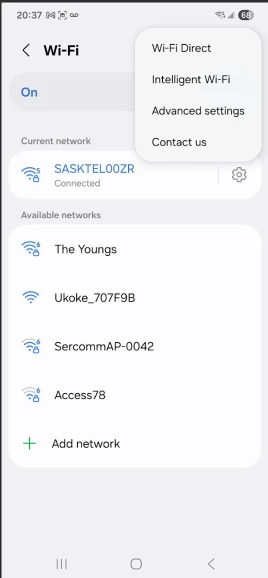
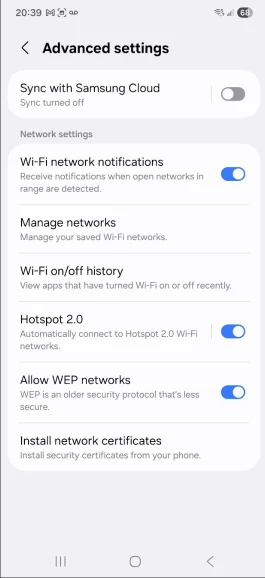
here are the screen shots i think you are looking for…


I tried in the advanced settings, but still nothing…


Thanks again


Dinh
Forum|alt.badge.img+4
  • Mobile Master
  • March 22, 2026

Unfortunately, this is not the correct settings area that  I asked you to check. You would have to go to Phone app and go to the “dial” screen. 


  • Author
  • Connector
  • March 22, 2026

yes, i found it in there and have turned on wi-fi calling.  i was looking in the wrong settings menu - didn’t realize there was more than one.

sorry for the bother and thank you for all of your assistance.


Dinh
Forum|alt.badge.img+4
  • Mobile Master
  • March 22, 2026

yes, i found it in there and have turned on wi-fi calling.  i was looking in the wrong settings menu - didn’t realize there was more than one.

sorry for the bother and thank you for all of your assistance.

I am glad that worked for you! Let us now if the phone can switch to WiFi calling when the cellular signal is weak.