Koodo Community
Question

Self Serve Registration (Public to Koodoo Port)

  • August 12, 2026
  • 10 replies
  • 79 views

Hello, I just triggered the Public to Koodoo port via eSIM. Whilst following the steps on checkout, I got sent an email to Complete my Registration. Then, I continued following the steps on checkout and on a page it displayed: “If you get an email about creating a Self Serve account, just ignore it.” I don’t know how this has impacted my registration but I can’t log into to Koodoo community using my email (the actual phone associated with the number, this is an alt). I really would like my Koodoo activation done ASAP due to some circumstances, would there be any way to verify my account with a Koodoo agent privately?? (I don’t see this option anywhere). 

10 replies

Forum|alt.badge.img+4
  • Mobile Master
  • August 12, 2026

Hi there,

just to confirm, did you receive any other confirmation saying that the activation has been successfully completed and is the Public Mobile service still active or is it now showing Koodo in your phone settings?

When you check your sim settings, is it showing the Koodo eSIM? If it is and your Public Mobile service has been deactivated and you’re using the Koodo service, then you will be able to setup your Koodo self-serve profile by following the steps in the email that you had received as the transfer was completed successfully.


Forum|alt.badge.img+4
  • Mobile Master
  • August 13, 2026

Did you receive an email from Koodo with instructions for the eSIM activation? If not, you may need to go to your nearest Koodo store to get a physical SIM card to activate your service.

Assuming you used the Fast Switch Self Serve option, it will take some time for your Self-Serve account to be migrated over to Koodo. Once it is ready, you should receive an email confirmation and you can access it with your existing login details from Public Mobile.

In the meantime, I have flagged a rep to confirm whether the port transfer went through.


  • Author
  • Connector
  • August 13, 2026

My PM has been deactivated I assume since I cannot login anymore. I was able to log into self-serve once and it did state that “My order was in progress”. 

I wish I was able to go to a physical store however I am currently abroad and won’t be back in Canada for two weeks. I needed to go through with this transfer urgently to be able to receive 2FA codes abroad (PM doesn’t offer this) for work reasons. I ensured that PM made my number open to port as well. 

I’m assuming its just a waiting game now but I am getting a little stressed as I have received no update emails apart from me being registered with Koodo. 


  • Author
  • Connector
  • August 13, 2026

Another issue now, whenever I try to log into my Koodo account, I get:

{"type":"PingFedError","status":500,"fields":[],"message":"PingFed: [500] Service Association - UserInfo: connection error"}

My connection itself, as in Wi-Fi stability and speed are just fine when used on other resources. Really not sure whats going on, feel a little lost in the dark. 


Forum|alt.badge.img+4
  • Mobile Master
  • August 13, 2026

hmmm I see. To confirm, when you began the process to switch to Koodo did you do it using the Public Mobile Fast Switch feature or did you order the service through the Koodo webstore? For Fast Switch, normally the number is brought over within minutes. If ordered through the webstore, where you see “in progress” in self-serve, that is because the order is being reviewed for approval by a Koodo rep. A rep will review your credit details and will approve the order within 1-3 business days, after which the account becomes active.

For logging into self-serve it can sometimes be picky, connection errors like those usually show up from Server connection issues. Try a different browser, clearing your cache and cookies, or trying a different device to login and that should do the trick. If you have a VPN active, try turning it off and singing in as well, sometimes this will cause you not to sign in.


  • Author
  • Connector
  • August 13, 2026

Yeah, I am able to log in again, clearing cookies and cache did the job. Thanks for that!

It says to check back in 3-4 days so I guess there’s nothing that can really be done except for wait. 

I ordered it through the Koodo webstore as that is the natural flow that Public Mobile guided me through when I clicked “Check out Postpaid Plans”. 


Forum|alt.badge.img+4
  • Mobile Master
  • August 13, 2026

Ah I see. Thank you for confirming. I am glad you got access again, self-serve can be picky sometimes. 🙂

Yes, in that case once order has been processed by a Koodo rep, you will receive a confirmation email and the account is active. From there, you should be able to download the eSIM profile to your device either through WiFi or they will send you an email with the eSIM as a QR code.

Note that the account may be setup with a temporary number and you may be required to port the PM number over after the fact. If that is the case, where the number is open to port on the PM side, it should bypass the need for the SMS verification. If you have issues with this, you will need to contact a rep.

The Fast Switch option is not available to everyone on PM as of yet as it is a new feature that they’re rolling out, so it seems that was not what was presented to you and it brought you to the usual activation method instead.

Once the account is activated, if you have issues receiving the eSIM profile let us know and we can notify someone to assist. For now though, you’re correct, it is a waiting game until the order is approved. 👍


  • Author
  • Connector
  • August 13, 2026

I guess I will see when the order processed by a rep, but I believe PM made my number open to port only for 24 hours and told me I was ready to migrate, so I started the process. I can’t log into PM anymore so not too sure how that will come to be when I get processed. We shall see. May need to contact a rep from a different PM account. 


Rox Koodo
  • Guardian
  • August 13, 2026

Hi there, ​@perpetualfly  ! I verified and unfortunately I see that your Community account is not linked to the Koodo profile yet, so we’re unable to access it. If you’re unable to find a way to connect using your Koodo account over here, the best thing would be to book a callback, using a different number, with our Teams using the Koodo Virtual Assist .  In case that’s not possible, please visit a direct store - you can locate the nearest one to your address here: https://www.koodomobile.com/en/find-nearest-store?srsltid=AfmBOopFU4VefTabRyRteflY5uVmUWmYGsuN5ka0SFz91hNRHaETl-Hs  


Koodo
Forum|alt.badge.img+4
  • Official Rep
  • August 13, 2026

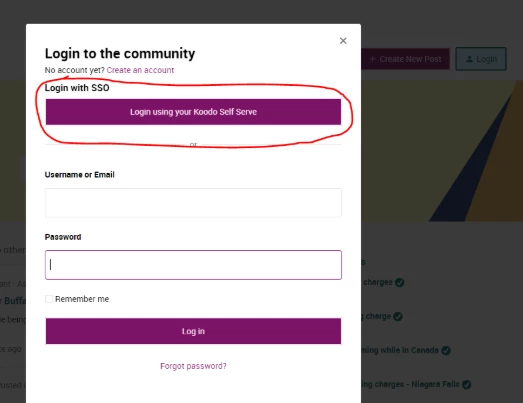
Hi ​@perpetualfly, you mentioned you have access to your online account, is this for Public Mobile or Koodo? If you do have access to the Koodo self serve, please log out of the Community and log back in, using your Self Serve account credentials as shown in the picture below. 

Unfortunately, if you did not complete your Koodo online registration, we have no way of accessing or authenticating the account here. 

If that is the case, you can try to send us a private message on social media via Facebook, Twitter/X or Instagram to see if we can identify the account through other means.