Koodo Community
Question

Voice Roaming

  • January 20, 2026
  • 12 replies
  • 76 views

In Philippines right now.  Put my Koodo sim into my phone to get a 2FA text and could not connect to a network (was showing Emergency Calls Only).  I then took off automatic network selection and tried selecting the two networks available here manually.  Could not connect to either.  Gave up and put my local sim back on my phone which is working fine.

Is there a way to tell if this is a Koodo network Roaming issue (data Roaming was turned off intentionally) or if perhaps I have a sim card issue?  Is it possible I have a setting wrong in my phone?

I did successfully connect to the network here a approximately 2 weeks ago with no issue and received a 2FA text.




12 replies

Dinh
Forum|alt.badge.img+4
  • Mobile Master
  • January 20, 2026

Have you checked if your plan has an international voice add-on in your account? It might be better to get the Easyroam package to make sure your phone has all the provisions.


  • Author
  • Guardian
  • January 20, 2026

The International Voice Add-On was definitely there before I left Canada.  I had checked it.  Have not logged into my account lately to ensure it's still there.  And I did connect via roaming maybe two weeks or so ago with no issue.

And no, I am not going to sign up for easy roam to have the priviliage of paying $16.00 to receive a 2FA Text.  I should not have too.  I am a Telus shareholder to receive dividends from what others pay, not to pay myself.


Forum|alt.badge.img+4
  • Mobile Master
  • January 20, 2026

If you dont use data, dont use talk, and done send a text, activating easy roam will not charge you for anything.  it is just a quick and easy way to ensure all of the roaming provisions are there.


But first thing I would do is login to your self serve to see if everything is working.  You can also try your sim in another phone to see if the issue follows the sim.


  • Author
  • Guardian
  • January 20, 2026

If you dont use data, dont use talk, and done send a text, activating easy roam will not charge you for anything.  it is just a quick and easy way to ensure all of the roaming provisions are there.


But first thing I would do is login to your self serve to see if everything is working.  You can also try your sim in another phone to see if the issue follows the sim.

Of course, the intent is not to use any voice or data services unless I need to contact someone in Canada in an emergency and my Fongo line does not work.  But the problem is that with data, you cannot always control background usage (though I have it shut off for most apps).  So I certainly will not sign up for easy roaming and pay $16.00 because WhatsApp checked for messages.  Was told before I left I could pay as I use if any (and that is the intent).  

I do not have another phone to check my Koodo sim unfortunately.  But my local sim is working just dandy, so it's unlikely to be the phone itself.


Forum|alt.badge.img+4
  • Mobile Master
  • January 20, 2026

Is your phone network setting set for 3G/LTE Auto?

Can you manually select a network


  • Author
  • Guardian
  • January 20, 2026

Is your phone network setting set for 3G/LTE Auto?

Can you manually select a network

I will have to put in the Sim card back in my phone when I get home and see what the settings are.  I was able to see the two networks (Smart and Globe)  that are here in my mobile network settings but could not connect to either.  Do not recall if it said whether they were LTE networks.  I will also check my self serve account.


I was also just thinking about whether the sim card could be an issue.  My phone was showing Emergency Calls Only. when the Koodo sim was installed.  Does that not imply that the network(s) here are reading my Simcard?  It's just not connecting to Koodo via roaming?


  • Author
  • Guardian
  • January 20, 2026

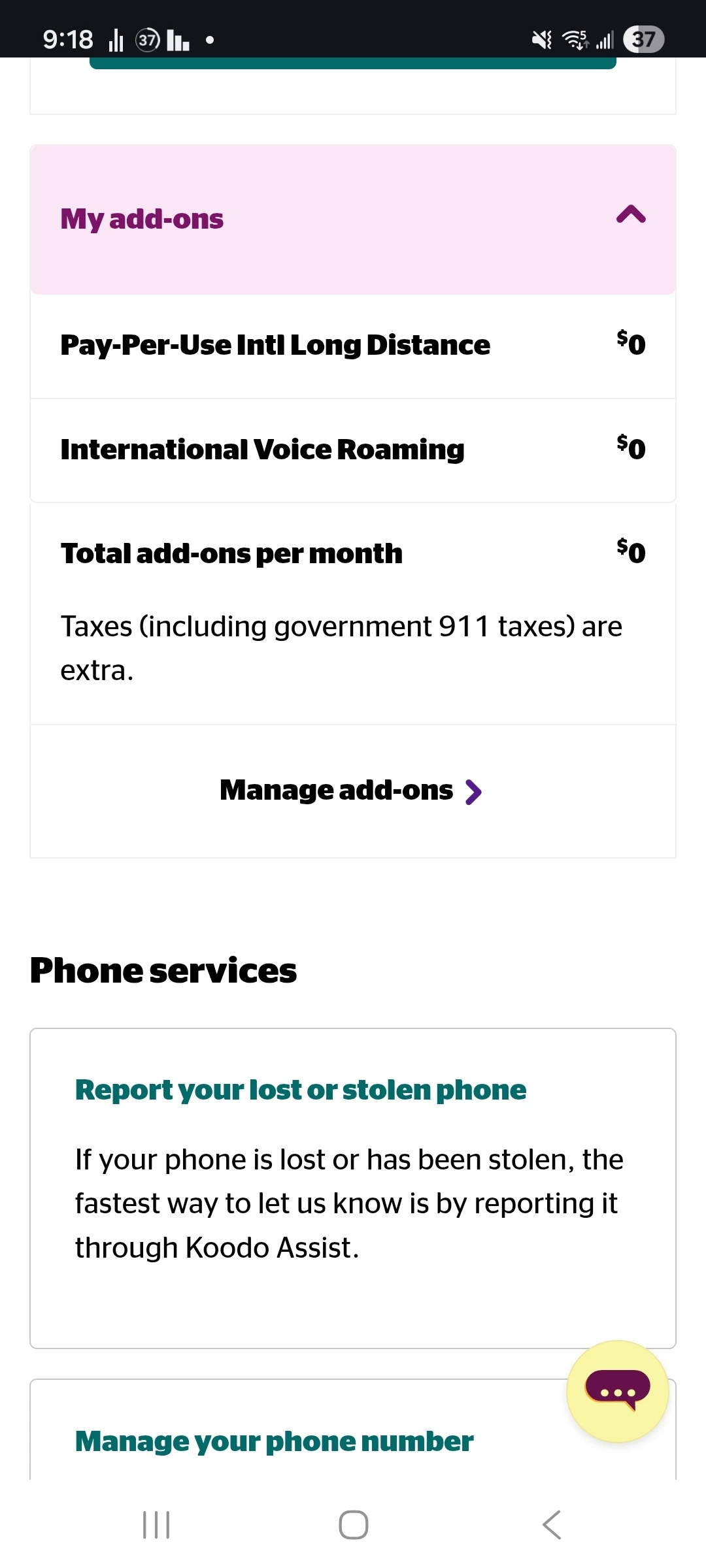
International Voice Roaming is on, but I am still showing emergency calls only.  I have the data completely shut off which likely explains why I cannot connect to the networks through mobile networks.


  • Author
  • Guardian
  • January 20, 2026

How can I tell with certainty whether I am set for  3G/LTE Auto?  I am using a Samsung A53 (Canadian Variant)


Dinh
Forum|alt.badge.img+4
  • Mobile Master
  • January 20, 2026

Is your phone network setting set for 3G/LTE Auto?

Can you manually select a network

I will have to put in the Sim card back in my phone when I get home and see what the settings are.  I was able to see the two networks (Smart and Globe)  that are here in my mobile network settings but could not connect to either.  Do not recall if it said whether they were LTE networks.  I will also check my self serve account.


I was also just thinking about whether the sim card could be an issue.  My phone was showing Emergency Calls Only. when the Koodo sim was installed.  Does that not imply that the network(s) here are reading my Simcard?  It's just not connecting to Koodo via roaming?

I would recommend you reset network settings of the phone to see if that can help. If you can see them, your phone should be able to connect if it is properly provisioned


Forum|alt.badge.img+4
  • Mobile Master
  • January 20, 2026

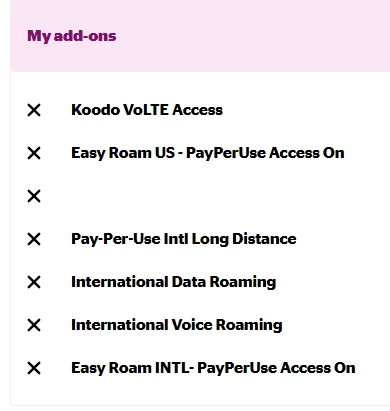
Here are my roaming add-ons.

Not having the international Data Roaming  add on mean you will not be able to use data while overseas.  However it looks like you are missing the Easy Roam INTL PayPerUse Access add-on which may explain why you are not able to connect.  Can you add this add-on?

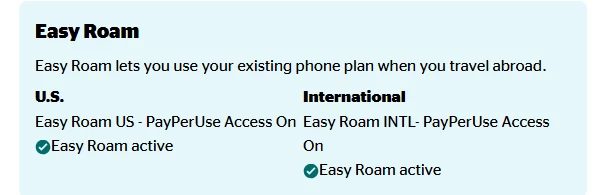
If you do not see this as an add-on to add, you can try to add Easy Roam.  And then remove it a few minutes later after you get the confirmation email to see if the pay per use add-on is applied.  Note that you will need to remove your International Data roaming add-on again if you did not want it.  You can do this while your phone is off or sim is out of your phone to prevent any Easy Roam charges


Forum|alt.badge.img+4
  • Mobile Master
  • January 20, 2026

Hmm.  I may be mistaken as those may be the easy roam provisions.  I still recommend turning on Easy Roam and then Turning it off again to see if the correct provisions are re-added.  Doesnt hurt to try


  • Author
  • Guardian
  • January 21, 2026

Hmm.  I may be mistaken as those may be the easy roam provisions.  I still recommend turning on Easy Roam and then Turning it off again to see if the correct provisions are re-added.  Doesnt hurt to try


I will try and get mine to match yours and retry.