Koodo Community
Question

Prioritize WiFi calling in weak network conditions

  • February 28, 2026
  • 24 replies
  • 185 views

LeahL95

For years now, I have tried and been unsuccessful in troubleshooting call quality issues with Koodo.  I always have to go through all the same steps, resetting all network settings and losing wifi passwords each time which never makes a difference.   Tried 2 new SIM cards as well. 
 

Something I found here in a thread locked to new replies is that Koodo and Telus disable the SIM setting to prioritize WiFi calling.  Prioritizing wifi calling is the recommendation that comes up most often online when looking for solutions, yet of course this has never been mentioned during troubleshooting as it appears that it is intentionally blocked.
 

Most places indoors that I use my phone have only 1 or 2 bars of cell service.    Even though I am also connected to strong wifi with fast speeds, the wifi is not being allowed to fully take over phone calls and the 1 bar of cell network is constantly fighting for priority.  If I am already on a call when the issues start happening, I can’t toggle on airplane mode and block the cell network without also losing wifi temporarily and losing the call.  Why is Koodo blocking the only option that would make this better and trying to tell me to just use my phone on airplane mode? 

24 replies

Dinh
Forum|alt.badge.img+4
  • Mobile Master
  • February 28, 2026

Which phone are you using? Typically 1,2 bar of signal will trigger wifi-calling. Have you tried to turn on airplane mode (with wifi on) to see if that can put the phone in wifi calling mode?


LeahL95
  • Author
  • Ambassador
  • February 28, 2026

This has occurred on every phone since switching to Koodo in 2022. Not just this iPhone. Like I mentioned, switching to airplane mode is not a solution when I am an hour into a phone call after waiting on hold. It drops the call, no way around it


Dinh
Forum|alt.badge.img+4
  • Mobile Master
  • February 28, 2026

This has occurred on every phone since switching to Koodo in 2022. Not just this iPhone. Like I mentioned, switching to airplane mode is not a solution when I am an hour into a phone call after waiting on hold. It drops the call, no way around it

Hi, I asked you to do that to check whether your Wi‑Fi Calling was actually working. I wasn’t asking you to switch between calls, since that would disconnect them (as you mentioned).
I’m just trying to confirm whether your phone is properly provisioned and able to use Wi‑Fi Calling normally.


LeahL95
  • Author
  • Ambassador
  • February 28, 2026

Wifi calling is provisioned to work. At my camp where there is no cell signal at all, wifi calling works very well. There are no interruptions or audio issues when on satellite wifi with no cell network to interfere


Dinh
Forum|alt.badge.img+4
  • Mobile Master
  • February 28, 2026

Wifi calling is provisioned to work. At my camp where there is no cell signal at all, wifi calling works very well. There are no interruptions or audio issues when on satellite wifi with no cell network to interfere

If Wi‑Fi Calling is properly provisioned, the issue may simply be getting it to trigger. I usually force the phone into Airplane Mode with Wi‑Fi turned on, then turn Airplane Mode off again. Doing this seems to “train” the device to trigger Wi‑Fi Calling more reliably.

Koodo’s choice to keep the network preference locked has been around for a while. I’m not a big fan of it either, but it’s the reality and customers just have to work around it..


LeahL95
  • Author
  • Ambassador
  • February 28, 2026

So what is the point of a cell company forcing its customers to turn the cell network off in order to make phone calls? You say that’s just the way it is.. but other companies clearly want their customers to have reliable and clear phone calls and don’t need to do this. 
Koodo can’t give me more than 1-2 bars of signal in my neighbourhood or at work and even at that level their SIM cards are not allowing the wifi calling to take over. The cell network keeps overriding it even at 1 bar when half the words are cutting out 


Dinh
Forum|alt.badge.img+4
  • Mobile Master
  • February 28, 2026

So what is the point of a cell company forcing its customers to turn the cell network off in order to make phone calls? You say that’s just the way it is.. but other companies clearly want their customers to have reliable and clear phone calls and don’t need to do this. 
Koodo can’t give me more than 1-2 bars of signal in my neighbourhood or at work and even at that level their SIM cards are not allowing the wifi calling to take over. The cell network keeps overriding it even at 1 bar when half the words are cutting out 

Indoor signal isn’t always the best. It happens to many customers. If you are not happy, honestly, you could always try out other carriers. We are all customer here, vote with your money!


LeahL95
  • Author
  • Ambassador
  • March 1, 2026

For most of the first year that I was with Koodo, I thought that it could be an issue with my phone- no amount of troubleshooting would ever lead anywhere.  Plenty of other glitches with Motorola and no software updates.  Thought a new phone should solve all those problems. After getting this IPhone I was locked into a tab for 2 years. It’s not so simple to vote by leaving and going to another company, since the phone would cost hundreds of dollars more if I paid the tab early.  Now this winter is the first time there have been any new perks or lower bill prices to stay competitive 


Dinh
Forum|alt.badge.img+4
  • Mobile Master
  • March 1, 2026

For most of the first year that I was with Koodo, I thought that it could be an issue with my phone- no amount of troubleshooting would ever lead anywhere.  Plenty of other glitches with Motorola and no software updates.  Thought a new phone should solve all those problems. After getting this IPhone I was locked into a tab for 2 years. It’s not so simple to vote by leaving and going to another company, since the phone would cost hundreds of dollars more if I paid the tab early.  Now this winter is the first time there have been any new perks or lower bill prices to stay competitive 

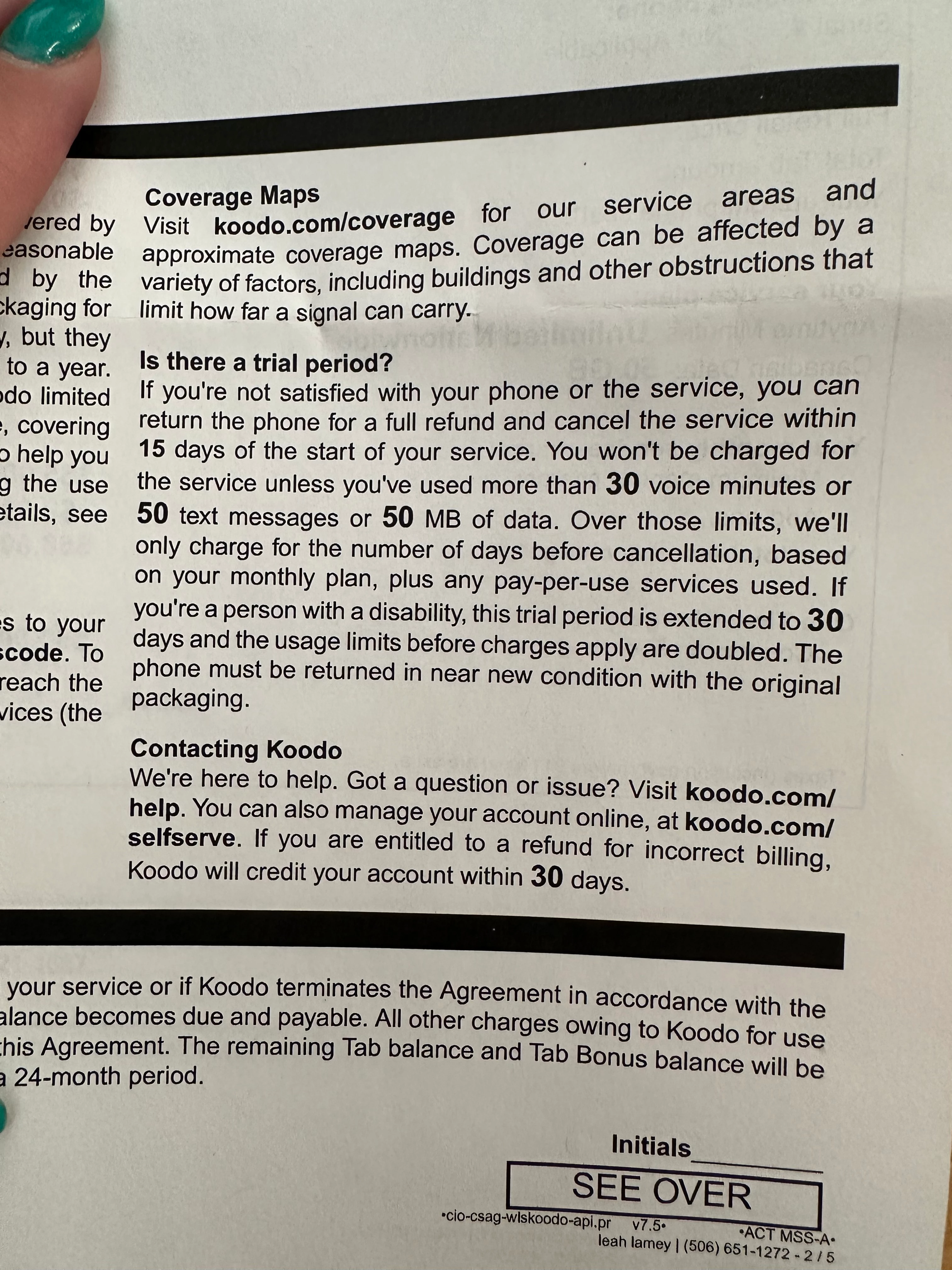
I understand where you’re coming from. When you first got the iPhone, there was a 15–30 day trial period to see if the features worked for you. After that window, most people just work with what the device/network offers. As you mentioned, it is what it is for now (or too expensive to change). The “network preferred” option has actually been around for years, and many people have asked about it before. Could Koodo change it in the future? Possibly, but it’s unlikely to happen anytime soon. 


LeahL95
  • Author
  • Ambassador
  • March 1, 2026

The trial period has a very limited call time window. By the time I would even be able to activate the phone and test the calling, let alone go through the first round of troubleshooting, the return window is closed.  Any time I have ever brought up the issues with call quality to Koodo, there are always a long list of steps I need to repeat like resetting all settings. When I have another failed or choppy call to report, I have to go through all the steps again from the beginning 


LeahL95
  • Author
  • Ambassador
  • March 1, 2026


Dinh
Forum|alt.badge.img+4
  • Mobile Master
  • March 1, 2026


That applies to your rate plan. For phones on Tab, the conditions for return is different. You can find more here https://www.koodomobile.com/en/help/returning-or-exchanging-your-koodo-phone?

If you’re not happy with the phone you purchased, you can return the phone for an exchange or refund provided that you meet the following conditions:

  • The phone is in like-new condition in the original packaging 
  • You show proof of purchase
  • Accessories are excluded unless they’re defective

LeahL95
  • Author
  • Ambassador
  • March 1, 2026

What the tab is supposed to give me for a return period isn’t really relevant to this since returning or replacing my phone was never an option accepted by Koodo at any point in the time it was under the tab.   The store my phone was ordered through was authorized as a seller for Koodo when I bought it.  The store also stopped having any involvement with Koodo in the time my phone was still on the Tab.  Koodo wouldn’t fix any issues that came from the 3rd party stores, especially if they no longer sell Koodo plans.  This became its own problem halfway through my tab and I found this out the hard way after a price increase. The link you attached has the same time frame and restrictions as my paper copy, just the asterisk that if purchased through another store, only the store can handle the return. At a maximum I would have had 15 days from Koodo, but I didn’t even have that realistically. 

The point here is that instead of working to improve the call quality by either improving the network or by allowing wifi to take priority, Koodo has its customers go through loops of endless repetitive troubleshooting that aren’t going to fix the underlying problem. 
 

Today instead of discussing how I could get my phone to reliably go through wifi calling and keep the weak network from jumbling up the call, the callback agent had me switch away from my physical SIM to an E-SIM.  The calls all day since then have either dropped or had audio as bad or worse than ever before.  There has to be a dropped call or an extended period of time where audio is interrupted before the network will allow wifi to take over. Even after wifi calling activates, it will switch back and forth 3 more times in the same call


Dinh
Forum|alt.badge.img+4
  • Mobile Master
  • March 1, 2026

I brought that up since you posted a snapshot of the service agreement, and I wanted to make sure everything stayed objective and relevant.

Switching to an eSIM shouldn’t impact your network reception, and call quality can also depend on the other person’s network. If the problem continues, it’s worth stopping by a Koodo kiosk and an Apple Store to confirm your iPhone is up to date and the firmware is working properly. 


LeahL95
  • Author
  • Ambassador
  • March 1, 2026

Dinh, if you honestly thought it was related to the version of software my iPhone is running, why would it happen on every update from August 2023 until now? That is more than one software version.  Seeing that it happened as well on a Motorola Edge Plus from 2022 to 2023, it is not an IOS version on this phone. 
Also to add, this is happening today across 4 different phone numbers. So the only consistent thing is my network, not theirs. 


Dinh
Forum|alt.badge.img+4
  • Mobile Master
  • March 1, 2026

Dinh, if you honestly thought it was related to the version of software my iPhone is running, why would it happen on every update from August 2023 until now? That is more than one software version.  Seeing that it happened as well on a Motorola Edge Plus from 2022 to 2023, it is not an IOS version on this phone. 
Also to add, this is happening today across 4 different phone numbers. So the only consistent thing is my network, not theirs. 

The help you can get from the customer forum is limited, and you’ve already explored many options yourself (contacting a rep, changing phones, etc.). you insist the issue is from the network (and I don’t disagree) but neither the forum nor a rep can fix tower signal, since a tower can’t be built overnight. You can check nearby tower locations using this map to see the distance of your location to a nearby tower https://www.ertyu.org/steven_nikkel/cancellsites.html

I don’t live in your area—and I don’t know where it is, since I’m just a customer like you and have no access to your information—so I can’t confirm what will work. That’s why I recommend visiting a Koodo store, where a rep can physically inspect the phone and/or Apple technicians can double‑check that everything is set up correctly.


LeahL95
  • Author
  • Ambassador
  • March 1, 2026

I already had lots of discussions about the location of the tower relative to my house both through conversations with tech support and with previous forum posts. I know they aren’t likely to set up a new tower near here any time soon.  The tower nearly all providers have their equipment on is at the end of my neighborhood in walking distance but is partially blocked by a hill. I have to work with the signal they have. Rogers has equipment on the same tower and I was with Rogers before switching to Koodo.  Reception is the same strength as it has been for the last 6 years, just newer equipment. 


The Koodo store has checked my phone over before and there is nothing abnormal about it. Like I said before- their only concern seems to be getting me to try another SIM card and reset my network settings.  Reaching out again today just had the same result.

I have access to Apple support by phone and computer and usually ask more specialized support questions that way since the store is more general and mostly focuses on sales of new phones and demoing features.  There is also no real Apple Genius Bar type store in this province, only Apple authorized sellers.  If anything, whenever I have talked to Apple support about anything, my phone is working as well or better than they would expect.  


LeahL95
  • Author
  • Ambassador
  • March 2, 2026

After reaching out to Apple support and allowing them to do diagnostics through remote access to my phone, there are no hardware or software issues.  They see very frequent connectivity issues and said there are several no service or low service logs as the reasons.  All of what they saw in these logs look like carrier related problems they said.  The settings for wifi calling are a carrier specific setting and there is nothing blocking the option from their side.

At this point, how do we flag a Koodo rep so this at least gets noted as a continued issue? 


Forum|alt.badge.img+4
  • Mobile Master
  • March 2, 2026

You’re saying that you got a rate plan increase while on a tab? That’s not supposed to happen. Unfortunately, there’s only 30 days notice that needs to be given, and I’m not clear if you’re able to refuse after that 30 day period on a tab contract. 

Unfortunately first level support is going to always ask to do the same troubleshooting procedures. When you open a technical support ticket, it gets noted as an issue.

For doing it here, my suggestion is when you select “+ create new post” that you select “idea” for what kind of topic you are creating, and highlight this issue of not being allowed to prioritize wifi-calling in low signal areas. That would get it noted properly here.  


LeahL95
  • Author
  • Ambassador
  • March 2, 2026

Goran- yes my bill went up $20 while I was about 15 months into the Tab.  Koodo would not do anything even though I went to the store the same month it happened.  They blamed the store that set it up and wouldn’t do anything to put me on a plan closer to the same price because I was on a tab and an existing customer, not a new activation. 
That is unrelated to the issues that were also going on at the time for call quality and calls dropping.  I understand that the first level support is limited in what they can do but the fact that it rarely gets any support past the first level, and is closed with no resolution any time it does is the issue.  The troubleshooting never leads back to wifi calling since the next level of support just checks the tower for abnormalities and closes the ticket because there was no outage. 


Forum|alt.badge.img+4
  • Mobile Master
  • March 2, 2026

Month 15 sounds like a credit. I do recall there have been time limited credits for 15 months given. Typcailly they are 12 or 24 months, but 15 also exists. If that’s the case, then it wasn’t a price increase, but a credit expiring. Is that what they explained at all? Or if you review the service agreement at the time of signing, or any bills, is there a credit line at all? Or did the base rate plan amount change? 

If you do technical support ticket again, I would specify that wifi calling will not work in a low signal area, rather than the issue of you being in a low signal area. And then I’d post the idea of getting that change done through here. A rep would see it and it would be forwarded for consideration. No guarantees of course. 


LeahL95
  • Author
  • Ambassador
  • March 2, 2026

Credit or not, my bill shouldn’t be going up $20 when I was told it wouldn’t. Especially since the standard of service isn’t deserving of a $110 a month phone bill when I can’t make phone calls. 
I am waiting on another call from Koodo sometime soon since the agent I spoke to yesterday was escalating to the next level.  The first level of support also wasn’t aware at all that wifi calling is locked to carrier preferred or that there was anything different than just wifi calling on or wifi calling off 


Forum|alt.badge.img+4
  • Mobile Master
  • March 2, 2026

The difference matters. A time limited credit is, by its nature, eventually expiring. If that’s what it was, it was always going to happen. I can’t speak to what exact verbiage you were told. 

I would then select a cheaper plan. $110 a month is a lot for a line by any standard. I would certainly expect wifi calling to stay active in your situation regardless. Hopefully something comes of it. 


LeahL95
  • Author
  • Ambassador
  • March 4, 2026

I received the call from the next level of support today and unfortunately nothing came of it and the agent wasn’t particularly helpful.  Nothing will progress past this point and he will not be sending the ticket on to anyone else.  It is effectively closed for trending and said all poor reception tickets get the same.  He did see that the issues are happening on calls with poor reception.  He seems to believe that nobody is blocked from having wifi set as priority in wifi calling unless they have an iphone where the option is missing.  Meanwhile Apple support points at the carrier for that setting as do many android owners in this forum who would otherwise have that choice.