Koodo Community
Answer

picture messages not sending

  • November 28, 2021
  • 9 replies
  • 3044 views

Yesterday I reset my networks and that erased all my Bluetooth connections. After I redid those, I can't seem to send or receive pictures messages now? 

Best answer by Dinh

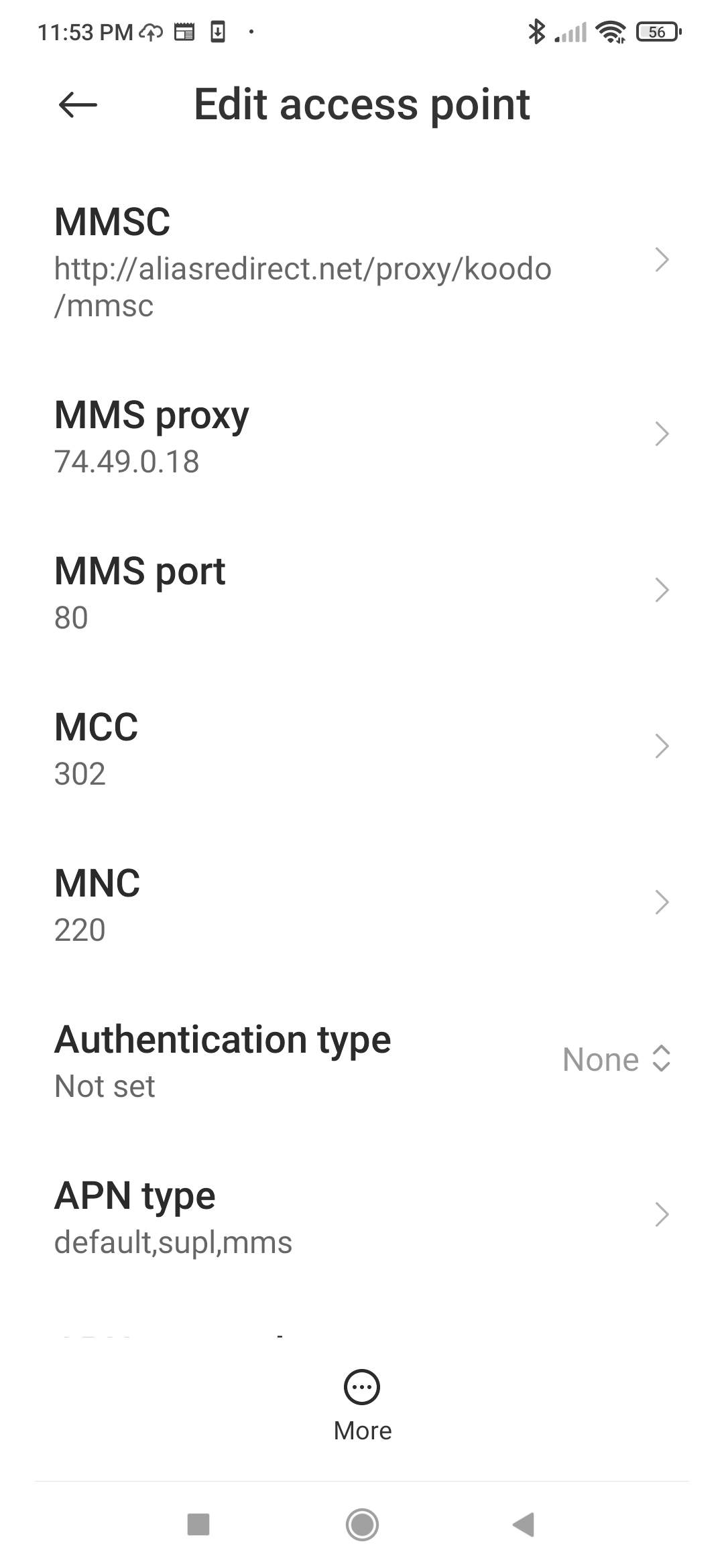
Your MMS proxy and MMS port wasn’t set correctly as per Koodo page above. Those value should be:

MMS Proxy: mmscproxy.mobility.ca

MMS Port: 8799

I recommend you  fix it and see if MMS works again.

This topic has been closed for replies.

9 replies

Dinh
Forum|alt.badge.img+4
  • Mobile Master
  • November 28, 2021

Which phone are you using? if it is an Android, can you check your APN settings and see if it was reset correctly as per this https://www.koodomobile.com/en/help/setting-data-your-non-koodo-phone

Also, I assumed your cellular data was ON?


  • Author
  • Coach
  • November 28, 2021

Which phone are you using? if it is an Android, can you check your APN settings and see if it was reset correctly as per this https://www.koodomobile.com/en/help/setting-data-your-non-koodo-phone

Also, I assumed your cellular data was ON?

Thanks. Yes it's an Android data is on and yes I checked those settings


  • Author
  • Coach
  • November 28, 2021

Which phone are you using? if it is an Android, can you check your APN settings and see if it was reset correctly as per this https://www.koodomobile.com/en/help/setting-data-your-non-koodo-phone

Also, I assumed your cellular data was ON?

Thanks. Yes it's an Android data is on and yes I checked those settings


Dinh
Forum|alt.badge.img+4
  • Mobile Master
  • November 28, 2021

Can you post a snapshot of your APN settings in the phone here? If it worked before and now it didn’t work, the MMSC might have set incorrectly.


  • Author
  • Coach
  • November 28, 2021


Dinh
Forum|alt.badge.img+4
  • Mobile Master
  • Answer
  • November 28, 2021

Your MMS proxy and MMS port wasn’t set correctly as per Koodo page above. Those value should be:

MMS Proxy: mmscproxy.mobility.ca

MMS Port: 8799

I recommend you  fix it and see if MMS works again.


  • Author
  • Coach
  • November 28, 2021

Your MMS proxy and MMS port wasn’t set correctly as per Koodo page above. Those value should be:

MMS Proxy: mmscproxy.mobility.ca

MMS Port: 8799

I recommend you  fix it and see if MMS works again.

Omg thank you SO much! Success! Appreciate the help!!


  • Author
  • Coach
  • November 28, 2021

Your MMS proxy and MMS port wasn’t set correctly as per Koodo page above. Those value should be:

MMS Proxy: mmscproxy.mobility.ca

MMS Port: 8799

I recommend you  fix it and see if MMS works again.

Omg thank you SO much! Success! Appreciate the help!!


  • Author
  • Coach
  • November 29, 2021

Your MMS proxy and MMS port wasn’t set correctly as per Koodo page above. Those value should be:

MMS Proxy: mmscproxy.mobility.ca

MMS Port: 8799

I recommend you  fix it and see if MMS works again.

Very helpful! Thanks so much!!!