Koodo Community
Question

Phone Call Quality

  • January 2, 2026
  • 14 replies
  • 107 views

LeahL95

In the main floor of my house, I have intermittent call quality issues- sound cutting out, jumbled robotic sounding audio, the other person saying they can’t hear me.  This is the most consistent area this occurs in but not the only time or place I have had it happen. 

I have tried troubleshooting before for these issues and usually don’t get much buy-in or follow up from Koodo aside from asking me to reset my network settings again. 
I have tried changing the SIM card, updating the phone, resetting the phone, resetting network settings, turning wifi calling on, turning wifi calling off. The issue doesn’t seem to be affected by doing any of these things. 
How do I get Koodo to seriously assess whether this is a network issue at my location when I just go through the same steps year after year with no change? I really don’t want to continue resetting all my Bluetooth and wifi connections from scratch every time I need to prove to them this issue is still occurring.  

14 replies

Dinh
Forum|alt.badge.img+4
  • Mobile Master
  • January 2, 2026

Which phone are you using? Indoor signal has always been a problem for cellular signal, especially in the winter when all the doors/partitions are closed. Typically, in these cases, Wi-Fi calling will help. Have you checked if the phone’s Wi-Fi calling was on at the time?

You could use this website to see close cell towers near your location: https://www.ertyu.org/steven_nikkel/cancellsites.html?


LeahL95
  • Author
  • Advisor
  • January 3, 2026

Wifi calling is on when this is occurring and I am in the same room as my wifi router. This happens all summer as well so it is not winter related- and I do not have doors or partitions closed in the winter. 
This is an iPhone 14pro but I have had similar issues on my last phone, a Motorola Edge plus. 
To get the call audio back, I have to go to the front of the house or go to the basement- which are less open and further from view of the cell tower


Dinh
Forum|alt.badge.img+4
  • Mobile Master
  • January 3, 2026

Wifi calling is on when this is occurring and I am in the same room as my wifi router. This happens all summer as well so it is not winter related- and I do not have doors or partitions closed in the winter. 
This is an iPhone 14pro but I have had similar issues on my last phone, a Motorola Edge plus. 
To get the call audio back, I have to go to the front of the house or go to the basement- which are less open and further from view of the cell tower

f the call disruption happened when you were using WiFi calling, the issue might be from the WiFi network and not the cellular signal (or weather) because the call was routed through WiFi to the Koodo server. I would recommend you reset the WiFi network and its modem as well. 


  • Guardian
  • January 3, 2026

You can get the opposite too.   I live in an area where the signal ranges from weak to non-existent.  When weak, sometimes the phone will try and use the cell signal and not the internet, resulting in garbled conversations.  I get around it by putting my phone in airplane mode so that the phone is forced direct my call through the internet.  Of course, your internet connection has to be good.  I would experiment with this and see if call quality improves.


LeahL95
  • Author
  • Advisor
  • January 3, 2026

To Dinh- the issue has continued across several different internet plans and routers. I have never had internet speeds less than 100 mb/s. My router had just been reset the day before the last occurrence. 
Koodo had requested I use wifi calling- rather than troubleshoot why the network was doing this. This issue started before I ever used wifi calling and wifi calling did not fix any issues. 


LeahL95
  • Author
  • Advisor
  • January 3, 2026

To Russ- I think this may have something to do with it. The area I get the most interference or call interruption is where the cell service and also wifi signal are strongest. There is only 1 to 2 bars of cell service anywhere in the house and at best 3 bars outside some places in the town I live in. I tried to stop using wifi calling alone with cell network off since I would sometimes need to leave the house during a call and go out of range of the wifi which would make the call drop. 


Dinh
Forum|alt.badge.img+4
  • Mobile Master
  • January 4, 2026

To Dinh- the issue has continued across several different internet plans and routers. I have never had internet speeds less than 100 mb/s. My router had just been reset the day before the last occurrence. 
Koodo had requested I use wifi calling- rather than troubleshoot why the network was doing this. This issue started before I ever used wifi calling and wifi calling did not fix any issues. 

Blaming the networ coverage  is the easiest thing customer could do. However it is the most difficult thing to fix since they can't build a tower right away or ask other carriers to share signal to fix.

I would recommend you try to enable the airplane mode similar to ​@RussKoodoo mentioned. That will force the phone to use WiFi calling all the time when you are at home. If the issue still persists, then we can try to work with the internet provider to see if they can fix the interference.


  • Guardian
  • January 4, 2026

To Russ- I think this may have something to do with it. The area I get the most interference or call interruption is where the cell service and also wifi signal are strongest. There is only 1 to 2 bars of cell service anywhere in the house and at best 3 bars outside some places in the town I live in. I tried to stop using wifi calling alone with cell network off since I would sometimes need to leave the house during a call and go out of range of the wifi which would make the call drop. 

Thanks fornthe signal information.  That signal is weak (I often cannot receive a text with 1 bar, ever mind have a phone conversation).  And 3 bars in town tells be that your town is not that close to the tower, at least not the Bell/Telus tower.  There are  apps that will show you on a map where the cell towers are in your location and who uses them.  Might be worth a look to see where the towers are as this might explain why your signal is not very strong.   


LeahL95
  • Author
  • Advisor
  • January 4, 2026

I checked the map provided yesterday and if it is true there isn’t even a Koodo or Telus tower on this side of the nearest City. However, Koodo’s cell coverage map shows that we should have 5G or at least LTE everywhere here. There is a tower within walking distance in my neighborhood but it is for Rogers and Bell. I was with Rogers the first few years here and the signal was not any better from them at the time. 
If 2 bars is weak to you, I’d hate to break it to you but most of New Brunswick is barely ever better than that and there are tons of dead zones. 


  • Guardian
  • January 4, 2026

Bell and Telus have a tower sharing arrangement in most of the country including New Brunswick.  So it's probable that your Koodo signal is coming from that tower in walking distance of your home  And if that is correct and since your Rogers signal sucked too there is somerhimg going on with that tower .  


LeahL95
  • Author
  • Advisor
  • January 4, 2026

In response to Russ- no I have been assured the tower is working fine. There are hills here and that was the explanation- people lower in the valley may get better reception from the tower but since I am on the same ridge as the tower and have part of the hill in the way that is the explanation for the reception only being around 2 bars.  
Where you are you must not have the same issues we have here but both places I have visited today within the city also have 2 bars of service.  


LeahL95
  • Author
  • Advisor
  • January 4, 2026


LeahL95
  • Author
  • Advisor
  • January 4, 2026

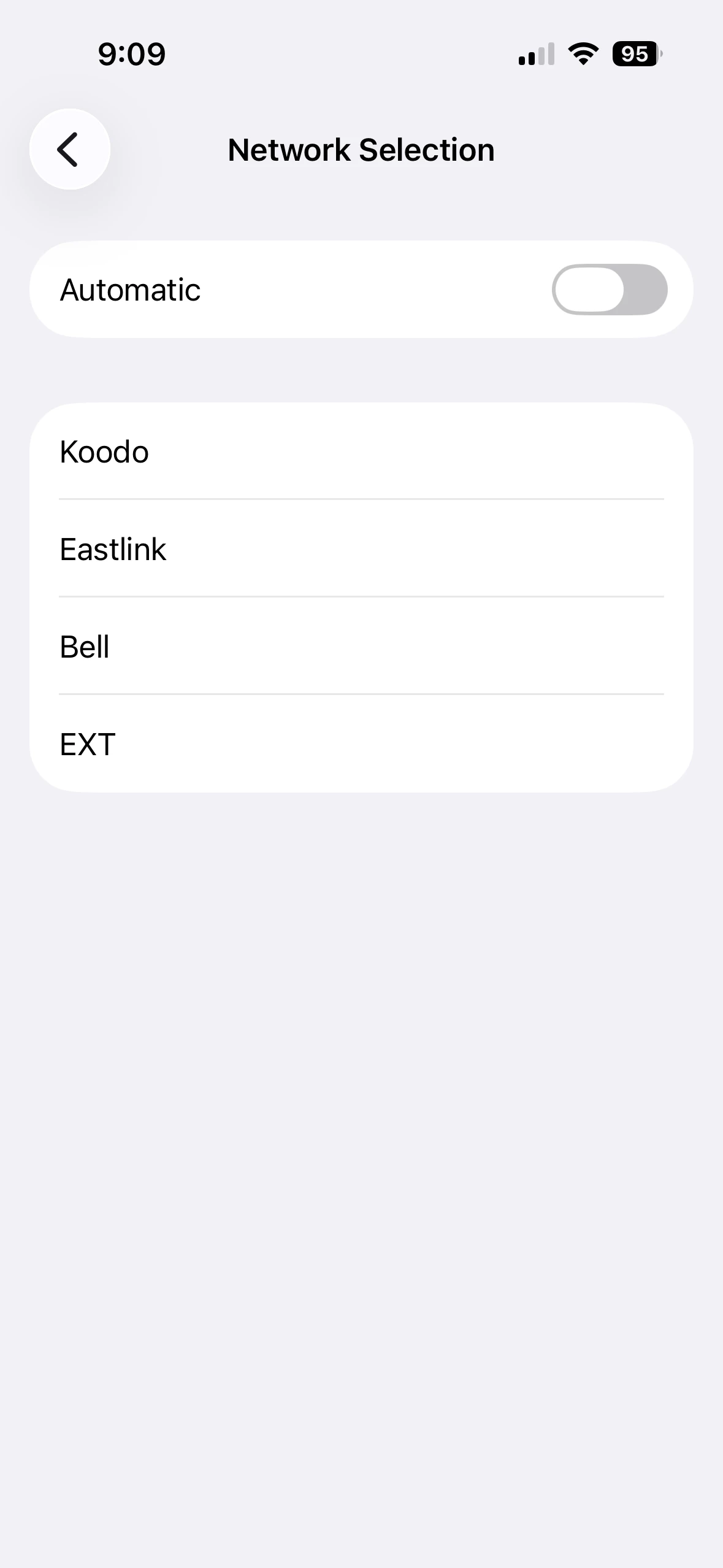
So to explain the picture- this is the level of signal and the available options at my house. Koodo is still there and is as strong as any others so the map posted above must be out of date and Koodo must be sharing space on the nearby tower.  Others seem to share the experience of 1-2 bars being too weak to reliably do most things.  That is the real problem and is common whether I am at work, at the golf course, in the driveway, at the mall- Koodo’s network is too frequently less than 3 bars and will randomly drop call audio or fail to send texts. Using wifi calling and turning my phone on airplane mode is a workaround and just masking the real problem rather than reporting it and working towards fixing it.  I don’t pay a phone bill every month just to turn my phone on airplane mode and use messenger or FaceTime anywhere I have wifi.  


Forum|alt.badge.img+4
  • Mobile Master
  • January 4, 2026

Unfortunately that means most of New Brunswick doesn’t have that good a signal. The actual signal strength isn’t linear with the 4-5 bars that you see on  nearly all cell phones. you’d have to look at the actual signal strength in dB to get a better idea. That can be looked at more closely in settings, or an app that is designed to analyze signal strength and direction and such.