Koodo Community
Question

Issues porting # from Telus landline to Koodo mobile

  • December 7, 2025
  • 16 replies
  • 94 views

I filled out the porting request on Koodo's website using my legal first name. The name at Telus, however, is spelled incorrectly, apparently. I only noticed this AFTER I initiated my porting request, when I claimed some rewards in advance of cancelling my account at Telus. I called Telus about this and the agent couldn't tell me the name they had on file. 

Should be a no-brainer, but it's not... when I first log into my Telus account online, I see the legal version of my first name: hello, __________. When I open my bill as a PDF, I see only my first and middle name initials. And when I redeemed some awards points, I saw a spelling of my first name that was never legal. Lastly, when I click on my Billing page, all that appears is my first initial and last name. 

I went in person to the main Telus/Koodo store in my city, and the clerk said the spelling of my name does not matter for porting purposes. I’m skeptical about this for assorted reasons. Also asked if I’d get some kind of notification from Koodo that the number was successfully ported, or rejected for that matter, and he had no clue. Also, there doesn’t appear to be any way to track the request’s progress--at least in my Koodo account.

Has anyone had a similar situation? Appreciate your helpful replies!

16 replies

Forum|alt.badge.img+4
  • Mobile Master
  • December 7, 2025

Porting your Telus landline number to Koodo mobile should not require the exact legal name spelling; the store clerk is correct that minor name spelling differences usually don’t block porting. The crucial part is that your Telus line is still active and you respond to the port confirmation SMS within 90 minutes. Koodo will send a “Welcome” SMS once porting completes. Unfortunately, there’s no direct way to track port status in your Koodo account. 


  • Author
  • Advisor
  • December 7, 2025

Thanks for replying, Robert T! Are you certain about the 90-minute window, though? I was reading some similar threads re: porting landlines and it seems that the window does not apply to landlines. 


Forum|alt.badge.img+4
  • Mobile Master
  • December 7, 2025

According to this article, yes. Not sure about the landlines tho. Is the problem fixed?


  • Author
  • Advisor
  • December 7, 2025

According to this article, yes. Not sure about the landlines tho. Is the problem fixed?


Thanks. That article is for mobile numbers, not landlines. It discusses the other provider’s SIM card; that doesn’t exist in the world of landlines. 

No, my problem is not fixed. I’m hoping it’s in the works, though. If I try calling my Koodo #, it’s basically not in service. And if I dial my landline # from my Koodo SIM (the one with the # not quite working), it rings, but my greeting does not come on, instead it jumps into my VM and tells me there aren’t any. I’ll ask someone to call my landline to see what happens. 

Landline forwarding can take up to 72 business hours. I’m not quite halfway yet, but I’d like to at least have a sense if it’s in progress and/or if Telus would’ve rejected it by now. Basically I’m after the process. I have a # from Koodo for theirs and Telus’s porting team, but they won’t be back at work until Monday, so I need to sit tight, I guess. 


Flo Koodo
Forum|alt.badge.img+4
  • Official Rep
  • December 7, 2025

Hi ​@chachkas 

We are unable to indetify your account based on your community profile, so we can check from our end.

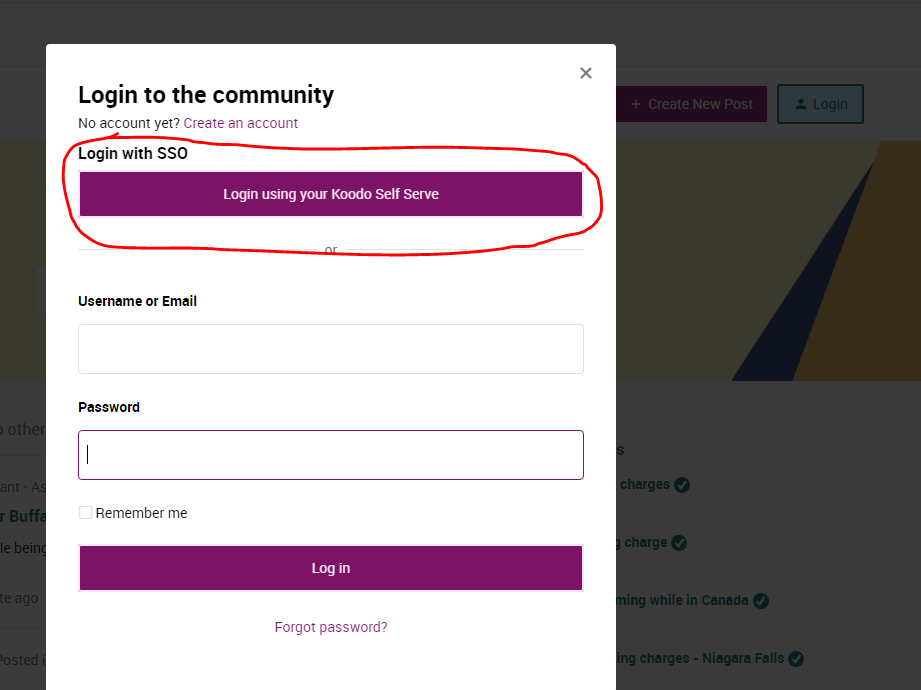
 Have you used the Login via self serve option in the community login page ? 


  • Author
  • Advisor
  • December 7, 2025

Hi ​@chachkas 

We are unable to indetify your account based on your community profile, so we can check from our end.

 Have you used the Login via self serve option in the community login page ? 

Hi Flo, I didn’t create my account here using the self-serve option. Can I DM you my details instead?


Flo Koodo
Forum|alt.badge.img+4
  • Official Rep
  • December 7, 2025

Hi ​@chachkas 

As much as we would love to help, we won’t be able to access the details from our end if the self serve login option is not used here on the community.


Dinh
Forum|alt.badge.img+4
  • Mobile Master
  • December 7, 2025

Hi ​@chachkas 

We are unable to indetify your account based on your community profile, so we can check from our end.

 Have you used the Login via self serve option in the community login page ? 

Hi Flo, I didn’t create my account here using the self-serve option. Can I DM you my details instead?

If you had the self-service credentials, it is advised you use it since rep can't check customer account without proper identification 


  • Author
  • Advisor
  • December 7, 2025

Hi ​@chachkas 

As much as we would love to help, we won’t be able to access the details from our end if the self serve login option is not used here on the community.

I tried that initially and it didn’t work. And now if I try to create another account using my account login it still doesn’t work. Just takes me to the Community page and still wants a login. 


Flo Koodo
Forum|alt.badge.img+4
  • Official Rep
  • December 7, 2025

@chachkas 

Please log out from this account and start creating the new account in incognito mode on your browser.

Let us know if it works.


Dinh
Forum|alt.badge.img+4
  • Mobile Master
  • December 7, 2025

Was there any specific errors that showed up? 

As well, can you try to log in using incognito mode or use a different web browsers?


  • Author
  • Advisor
  • December 7, 2025

@chachkas 

Please log out from this account and start creating the new account in incognito mode on your browser.

Let us know if it works.

It does NOT work. The original account was set up on Firefox on my iMac. At that time, as stated above, it did not let me create an account using my Koodo login. I have a prepaid account. Is that the problem?

I then tried creating an account from my phone using either Google or Safari. Again, it did not work. I tried your ‘incognito’ option on Safari on my iPhone, once again, it did not work. 

Now I’ve gone back to my iMac and tried incognito on Firefox, and still it does not work! 


Any method I try via my self-serve Koodo account… it just keep me in a useless loop. Very frustrating! Is there a number I can call at this hour to see what the status is of my porting request? 

I appreciate you trying to help, but this is just an exercise in futility at this point. 


Dinh
Forum|alt.badge.img+4
  • Mobile Master
  • December 7, 2025

Prepaid account might have contributed to the issue. Still I saw many prepaid customers in the forum.

Anyway, if you are a prepaid and porting from a landline, I recommend you schedule a call back from Koodo and ask a prepaid rep to look into it www.koodo.com/prepaidchat


  • Author
  • Advisor
  • December 7, 2025

Prepaid account might have contributed to the issue. Still I saw many prepaid customers in the forum.

Anyway, if you are a prepaid and porting from a landline, I recommend you schedule a call back from Koodo and ask a prepaid rep to look into it www.koodo.com/prepaidchat


Thanks. I was given a phone # for what appears to be Telus’s porting team so I’ll try them again on Monday. 


Dinh
Forum|alt.badge.img+4
  • Mobile Master
  • December 7, 2025

Prepaid account might have contributed to the issue. Still I saw many prepaid customers in the forum.

Anyway, if you are a prepaid and porting from a landline, I recommend you schedule a call back from Koodo and ask a prepaid rep to look into it www.koodo.com/prepaidchat


Thanks. I was given a phone # for what appears to be Telus’s porting team so I’ll try them again on Monday. 

That team, from what I heard can only help with an ongoing port. I am not sure if your port request has been initiated or cancelled. It might be useful to contact Koodo directly. 

Landline porting is complicated, from what I read, in some cases they had to physically went to the area and unplugged the cable.


  • Author
  • Advisor
  • December 8, 2025

Prepaid account might have contributed to the issue. Still I saw many prepaid customers in the forum.

Anyway, if you are a prepaid and porting from a landline, I recommend you schedule a call back from Koodo and ask a prepaid rep to look into it www.koodo.com/prepaidchat


Thanks. I was given a phone # for what appears to be Telus’s porting team so I’ll try them again on Monday. 

That team, from what I heard can only help with an ongoing port. I am not sure if your port request has been initiated or cancelled. It might be useful to contact Koodo directly. 

Landline porting is complicated, from what I read, in some cases they had to physically went to the area and unplugged the cable.

When I call the porting support # from the number in question, the auto service states it’s “in progress.” As above, I’ll call on Monday so I can speak to an actual person. No one at Koodo has been helpful thus far as the request is being handled by Telus.