Koodo Community
Question

Issue with Number Change on Prepaid Self-Serve Platform

  • April 28, 2025
  • 10 replies
  • 201 views

Charles_

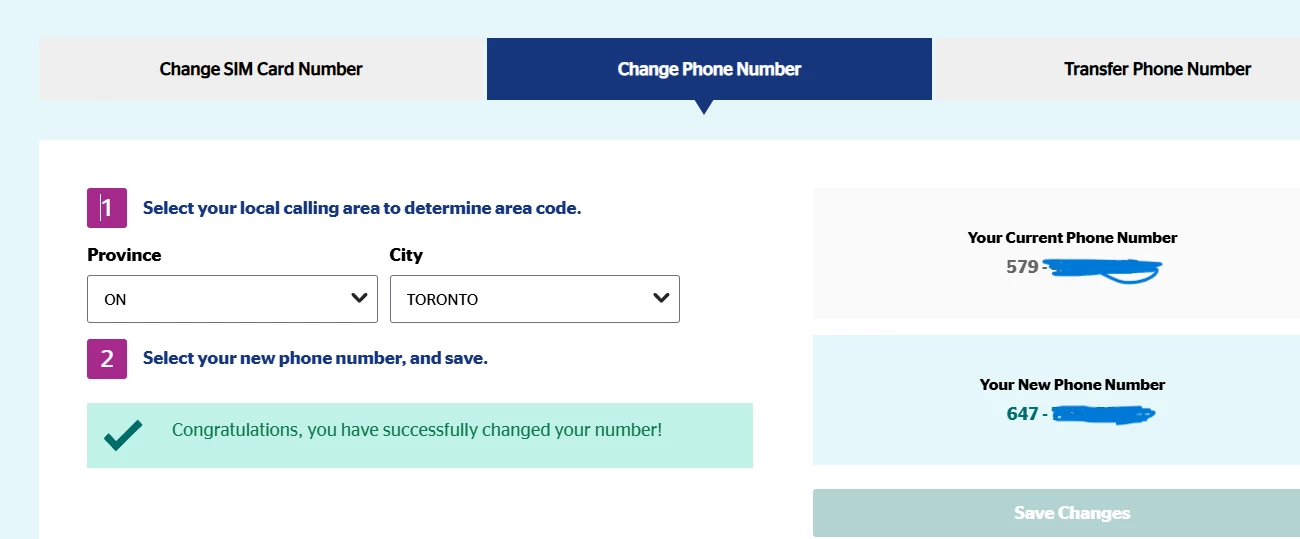
I am a Koodo prepaid customer. I tried to change my number on the prepaid self-serve website and set my location to Toronto. Everything went smoothly, I selected a new number, and I received an authorization code via email. After entering the authorization code, the page indicated that the change was completed. However, after refreshing, my number still hasn’t changed. I also tried calling using my SIM card, but the number remained the same. I have attempted this process twice, and my number hasn’t changed either time. I would like to know how I can successfully change my number.

This topic has been closed for replies.

10 replies

Forum|alt.badge.img+4
  • Mobile Master
  • April 28, 2025

Did you restart your phone after the port transfer?


Charles_
  • Author
  • Organizer
  • April 28, 2025

Did you restart your phone after the port transfer?

I didn’t, but now I do. the number remained the same.


Forum|alt.badge.img+4
  • Mobile Master
  • April 28, 2025

It is possible that the port transfer did not go through. Are you able to try again on the Self-Serve portal?


Charles_
  • Author
  • Organizer
  • April 28, 2025

It is possible that the port transfer did not go through. Are you able to try again on the Self-Serve portal?

I tried twice yesterday and once again just now. It showed the result as in the picture, but after refreshing the page, my phone number did not change.


Forum|alt.badge.img+4
  • Mobile Master
  • April 28, 2025

Are you using your old SIM card and responding back to the text message before inserting your Koodo SIM card? https://www.koodomobile.com/en/help/moving-your-number-koodo

If your old SIM card is still working, that means the port transfer did not go through.


Charles_
  • Author
  • Organizer
  • April 28, 2025

Are you using your old SIM card and responding back to the text message before inserting your Koodo SIM card? https://www.koodomobile.com/en/help/moving-your-number-koodo

If your old SIM card is still working, that means the port transfer did not go through.

I don't quite understand. I currently have only one SIM card, which is from Koodo. I saw in the system that I could change the phone number associated with this card, so I wanted to change my phone number. I live in Ontario, and the prefix of my current number seems a bit strange. I have not changed my service provider, and there is no "old SIM card" or "new SIM card" situation. The link you provided seems to be about how to change numbers when switching service providers.


Forum|alt.badge.img+4
  • Mobile Master
  • April 28, 2025

Just to confirm, you do not have an existing account with another carrier and you are not trying to port over your phone number. You are only trying to change your phone number from the one provided. Is that correct?


Charles_
  • Author
  • Organizer
  • April 28, 2025

Just to confirm, you do not have an existing account with another carrier and you are not trying to port over your phone number. You are only trying to change your phone number from the one provided. Is that correct?

yes


Forum|alt.badge.img+4
  • Mobile Master
  • April 28, 2025

In that case, you should visit the following link and try the steps to change your number on your Self-Serve account. You may need to change your province to Ontario, since the area code for the number provided is based in Quebec. https://www.koodomobile.com/en/help/changing-your-phone-number


Charles_
  • Author
  • Organizer
  • April 28, 2025

I have discovered the issue. Some required fields in the personal information section of my card are left blank. I need to fill in my personal information first before any actions, such as changing my phone number or changing the plan, can proceed properly. However, the system did not prompt me to complete my personal information; it just displayed a success message, but in reality, no changes took effect. Anyway, thank you very much for your response.