Koodo Community
Question

Add a line and secondary accountaccess

  • February 18, 2026
  • 3 replies
  • 18 views

I’ve added a line to my account and my partner has now switched from Roger’s to Koodo with a tone of savings for essentially the same plan. Hooray! 
 

But, I was reading somewhere on the website or FAQ about calling support for adding another email linked to this line so that they have access to the account. Or minimum some features, like viewing usage and charges etc, not full management access for security reasons 

for the life of me cannot find where I was reading this and the virtual ai assistance says I can but need to call support which I’ve done and they cat I cannot add an email profile.. 

Is this even possible? Should I go to the kiosk and talk to an employee to help? 
 

Secondly, we choose for her to have the same monthly plan as me with all the same features and inclusions, but theirs was available at $50 (it’s not a special rebate or rate for switching it’s the one advertised online to monthly members) but I canwhile mine is $65. What’s the deal there? I suppose another call for support. 
 

Any insight if someone has experienced the same and solved this would be great.! 

3 replies

Forum|alt.badge.img+4
  • Mobile Master
  • February 18, 2026

I don’t think Koodo has a built-in feature to grant limited account access (like viewing usage/charges) to a secondary email or person. You'd need to share your Self Serve login credentials directly, which isn't ideal for security. Is there a reason you don’t have each an account? 


Flo Koodo
Forum|alt.badge.img+4
  • Official Rep
  • February 18, 2026

Hi ​@Ebonezz 

We have looked into it and we can see that the 2 plans are different, one includes more data while the other one less data, we recommend checking the details of the plans in self serve.


Regarding the self serve access, a subscriber can request manager access using a different email that they will need for the self serve login.

The account owner would need to approve his request after they are requesting the access.


For the subscriber to request access, they would need to follow these steps:

  1. Go to the login page on the self-service portal and use the *Register* option, using an email address that is different from the one you currently use.
  2. Enter the account number of your Koodo account (found on your agreement or bill).
  3. Submit the request—a window will pop up to confirm: “Request for approval. We have sent them a request and will email you when it is approved.

More about this can be found here  https://www.koodomobile.com/en/help/giving-manager-access-to-users-on-your-self-serve-account

and here https://www.koodomobile.com/en/help/permissions


Forum|alt.badge.img+4
  • Mobile Master
  • February 18, 2026

But, I was reading somewhere on the website or FAQ about calling support for adding another email linked to this line so that they have access to the account. Or minimum some features, like viewing usage and charges etc, not full management access for security reasons 

for the life of me cannot find where I was reading this and the virtual ai assistance says I can but need to call support which I’ve done and they cat I cannot add an email profile.. 

Is this even possible? Should I go to the kiosk and talk to an employee to help? 


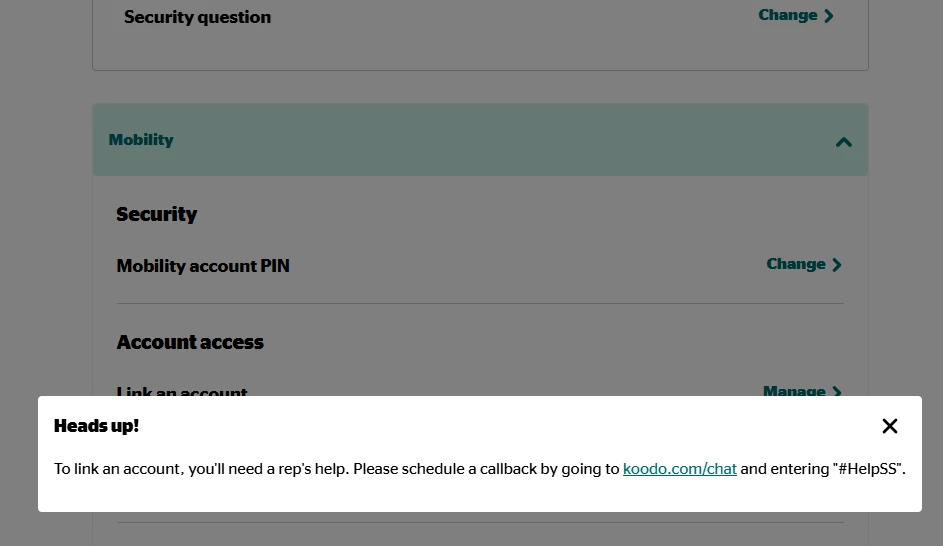
You will need to schedule a callback to speak with a rep to add a user

https://www.koodomobile.com/en/help/permissions


Secondly, we choose for her to have the same monthly plan as me with all the same features and inclusions, but theirs was available at $50 (it’s not a special rebate or rate for switching it’s the one advertised online to monthly members) but I canwhile mine is $65. What’s the deal there? I suppose another call for support. 

What plan do you have?

What is her plan?

In self serve when you go to change plans, what plan options do you see?

Screenshots would be helpful, just make sure to black out any personal info