Koodo Community
Question

Internet Connection Issues
  • December 20, 2025
  • 8 replies
  • 69 views

I have been having ongoing issues with my home internet suddenly losing connection, even though ALL connection lights are on, on both the router, and wifi box. It works for a day/2, then shuts off, then comes back on its own, or if I reboot the Router. I’ve never had this problem with other providers before in the same location. And the equipment HAS been replaced, but the problem is STILL happening! Its happening right NOW! I’m having to use my PHONE’s 5G connection to get online. Has anyone else had this problem? Should I look to switching providers/equipment? Help!

8 replies

Dinh
Forum|alt.badge.img+4
  • Mobile Master
  • December 20, 2025

If it happens with the previous ISP at the same location. There might be issue with physical connection path to the server. Koodo internet support, however is limited in the forum. You have to schedule a call back again and ask a tech to check


Flo Koodo
Forum|alt.badge.img+4
  • Official Rep
  • December 21, 2025

@Doz 

We are sorry to hear that you are having issues with the services.

We see that you managed to get in touch with a rep in the meantime.

Let us know if you have further questions.


  • Coach
  • January 4, 2026

Dear Koodo team,  


I have been having issues with my internet lately and right now it’s not even connecting at all, I have restarted the modems severally and seem to have run out of luck rebooting them. I need urgent help as I need to write an exam in 24hrs and I need the internet. I look forward to your assistance.


  • Coach
  • January 5, 2026

I need help guys, my issue still persists ! 
 

thanks 


Dinh
Forum|alt.badge.img+4
  • Mobile Master
  • January 5, 2026

I need help guys, my issue still persists ! 
 

thanks 

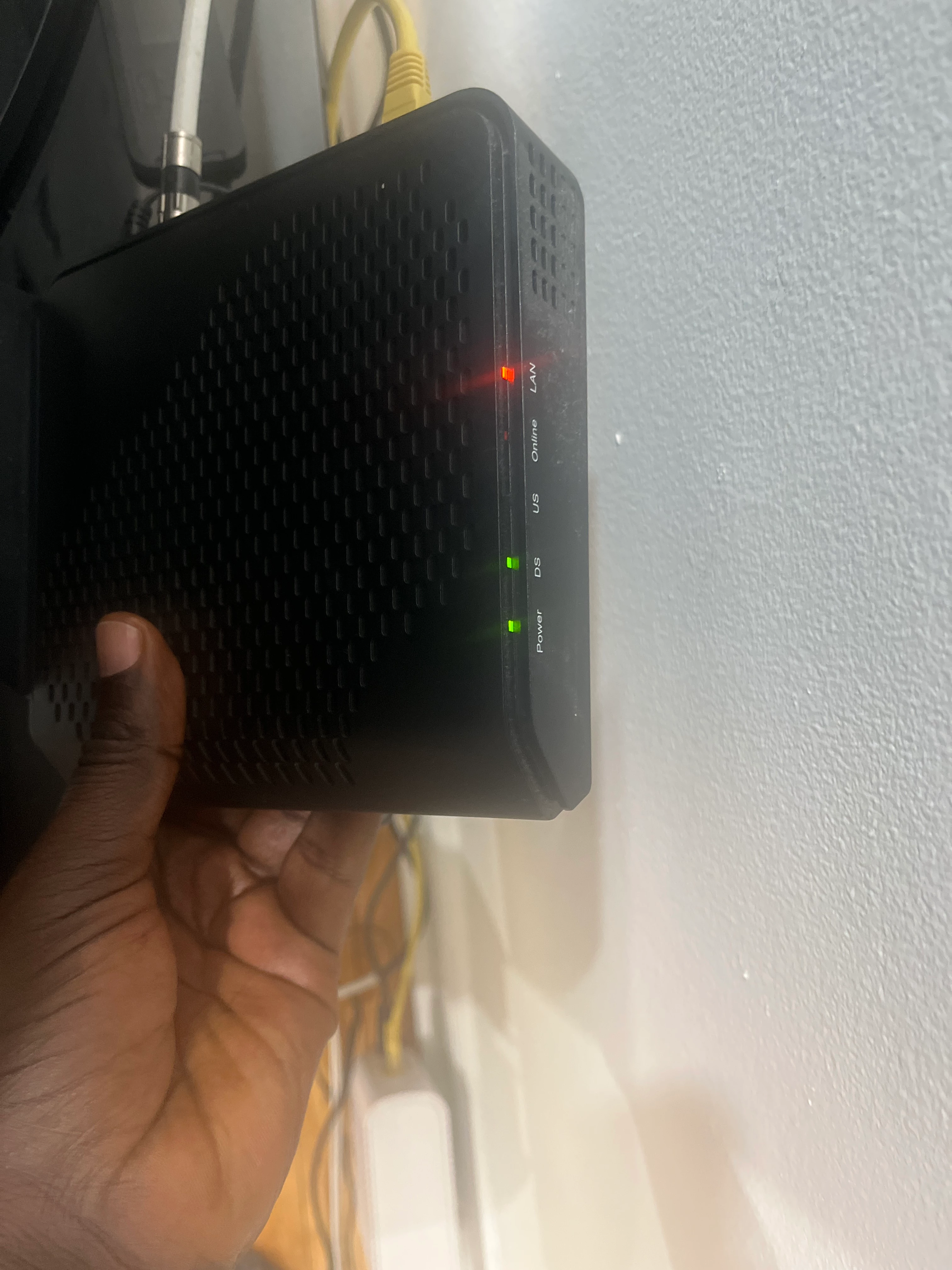
As of now, what is the condition of the light on the modem? https://www.koodomobile.com/en/help/understanding-your-modem-and-router?

Are all light green?

as mentioned above, for technical support for urgent matter, it might be useful to schedule a call back with their digital assist www.koodo.com/chat


  • Coach
  • January 5, 2026

@Dinh all lights are not green only 2 are stable, the last one is blinking, I have have restarted both modems several times, it’s the same.


  • Coach
  • January 5, 2026


Dinh
Forum|alt.badge.img+4
  • Mobile Master
  • January 5, 2026


Since the DS light of the modem wasn’t turned on in the photo, the modem didn’t have a connection to the server.

I would recommend checking the physical connection of the coaxial cable inside and outside the house to ensure there is no damage. You can also try to tighten the connection. Reset the modem as well to see if that light turns on. 

If those doesn’t help, you will probably need to contact Koodo technical support by scheduling a call back from them.

