Koodo Community
Question

I am a New Customer

  • November 28, 2025
  • 23 replies
  • 153 views

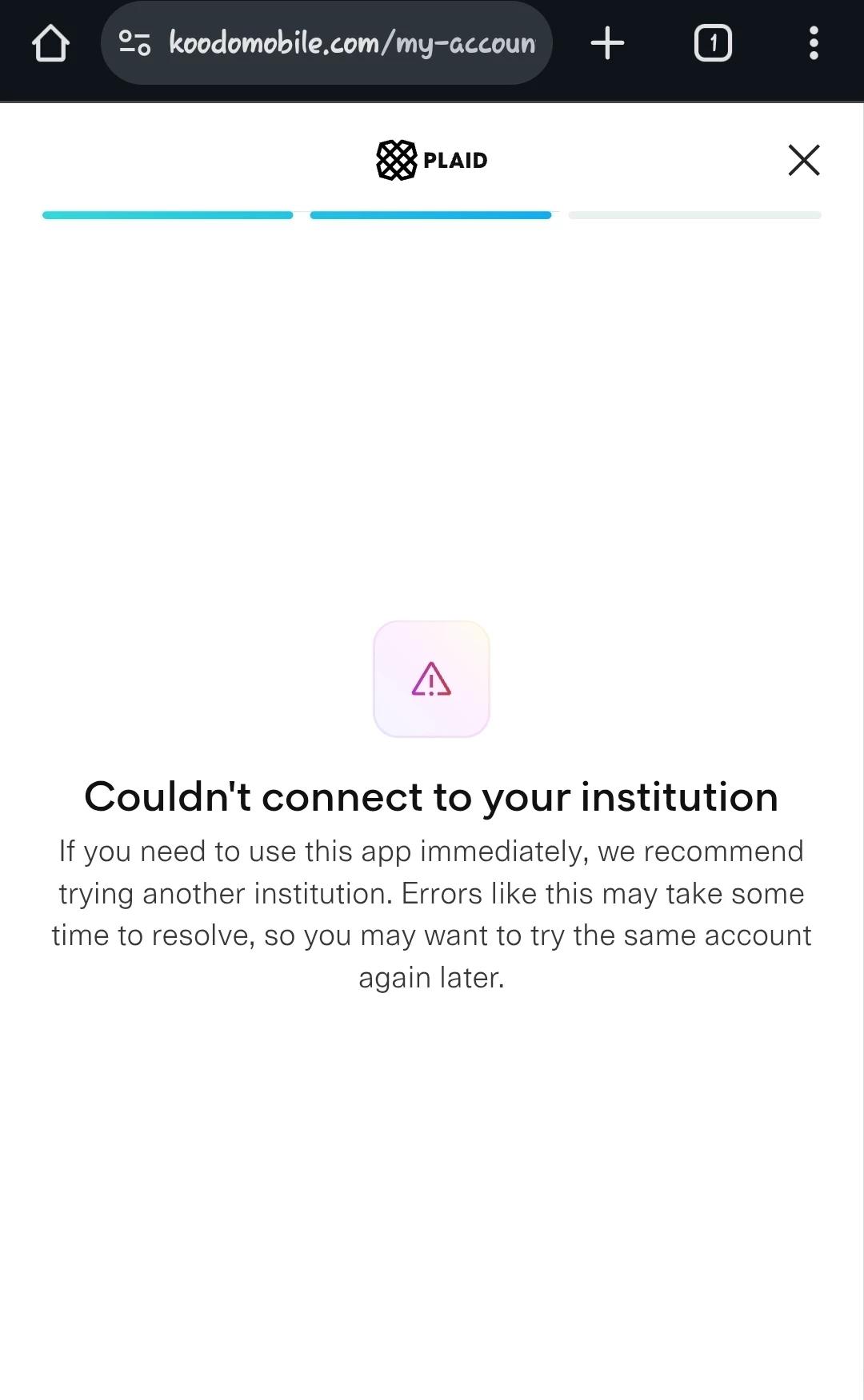
Hello Community, I just transferred from Freedom to Koodo what is the Difference between Monthly Customer and Prepaid Customer and also I am trying to link my Bank Account to Plaid since yesterday but it is not working

Please help out 


Thank You 

23 replies

Forum|alt.badge.img+4
  • Mobile Master
  • November 28, 2025

Hi there,

there is a few.

Prepaid

customers cannot finance a device, it is a subscription service so you don’t receive a bill for the service, it does not build your credit, and it misses some features like Wi-Fi calling, international roaming and 5G. Because it is a subscription though, it does not require a credit check and there are no additional fees besides the initial plan cost. You can also only have one number per prepaid account.

Regarding roaming, it does not have Easy Roam, so you have to add US addons separately to be able to use the service in the USA but can only be used there - You cannot use prepaid in a country other than the USA and Canada.

Postpaid

You can finance a device, has Wi-Fi calling, builds your credit, can have multiple lines, has roaming options both international and the USA, has a monthly bill, and offers an additional free perk on your plan.

However, it requires a credit check to get postpaid, the plans generally are more expensive, and if you get the service with the help of a rep or in person, you’re charged an $80 connection fee. This fee can be avoided if you order the service online.

That’s a lot of info so let me know if that answers your question or if you wanna know anymore specifics and note I may have missed some. Regarding the auto pay by bank account, try a different browser, device, or try clearing your cache and cookies and see if that works. 🙂


  • Author
  • Advisor
  • November 28, 2025

I noticed that I can log in to the mobility section and not the prepaid section 

Then my plan is 45 dollars at First then second month I am getting a Discount as I did at the Walmart Wireless Department they gave me a hold deal due to Black Friday 


Forum|alt.badge.img+4
  • Mobile Master
  • November 28, 2025

Nice, yeah if you can’t login to prepaid section but can postpaid then it would be postpaid.

A lot of the plans consist of a credit if bank payment is setup so just make sure it gets setup before the next billing cycle as the discounts begin then - if not setup properly you don’t receive the discount. If they gave you any additional credits, they also usually get applied starting the next cycle.

Does it still show an error when you try to add it or did you manage to add it? If it is still giving you issues, what error does it show?


Forum|alt.badge.img+4
  • Mobile Master
  • November 28, 2025

About linking your bank account to Plaid: since others already suggested clearing cache and trying different devices, a new angle is to check if your bank or Plaid is having temporary service issues or maintenance. Sometimes Plaid blocks access if there’s a verification glitch or if your bank uses extra security layers. 


  • Author
  • Advisor
  • November 28, 2025

It's not Postpaid they wrote Mobility and when I try to do it it gives me an error saying that I should try again later 


Forum|alt.badge.img+4
  • Mobile Master
  • November 28, 2025

Since you can log into Mobility but not Prepaid, you’re definitely on a postpaid (monthly) plan, not prepaid. The “Mobility” label is what Koodo uses for postpaid accounts.

The error when linking your bank account through Plaid might be because Plaid doesn’t support all banks or some banks block third-party access. Try adding your bank account directly through the website instead of Plaid; sometimes that works better.


  • Author
  • Advisor
  • November 28, 2025

The exact error message says that I should try again later 


  • Author
  • Advisor
  • November 28, 2025

Since you can log into Mobility but not Prepaid, you’re definitely on a postpaid (monthly) plan, not prepaid. The “Mobility” label is what Koodo uses for postpaid accounts.

The error when linking your bank account through Plaid might be because Plaid doesn’t support all banks or some banks block third-party access. Try adding your bank account directly through the website instead of Plaid; sometimes that works better.

If you’re still stuck, check if your bank is listed in Koodo’s supported banks here: https://www.koodomobile.com/en/help/bank-account-payment

The link not working 


Forum|alt.badge.img+4
  • Mobile Master
  • November 28, 2025

Edit: To clarify, the documents you get won’t say postpaid that is just a term used in the industry to differentiate between the services. If a credit check was required and you were given credits, a monthly bill date etc, then you have postpaid.

Did you try the suggestions I made using a different browser, a different device, or clearing cache and cookies? This usually helps with adding pre-authorised payments.


  • Author
  • Advisor
  • November 28, 2025

How do i clear a cache am using Opera Browser and Chrome Browser 


Forum|alt.badge.img+4
  • Mobile Master
  • November 28, 2025

Forum|alt.badge.img+4
  • Mobile Master
  • November 28, 2025

How do i clear a cache am using Opera Browser and Chrome Browser 

sure, so for google chrome do the following:

  1. open chrome then click the three little dots in the top right corner
  2. click the dots and that will provide a drop down menu, click settings
  3. go to clear browsing data
  4. choose the time range, I would do the last week if you choose
  5. it will then ask what to delete, select cache and cookies then hit clear and you’re done.

For the opera browser I think it is very similar. Go to preferences after hitting the red O in ther corner, in there you want privacy and security.

There should be an option to clear browsing data, at that point you should be presented similar options to google. Another thing to try is using an incognito tab and if you have one turn off any VPN you have.


Forum|alt.badge.img+4
  • Mobile Master
  • November 28, 2025

Coming back to Plaid subject, you might be interested in Koodo’s reply here : 

Also, I stumbled upon this FAQ about Plaid

https://www.koodomobile.com/en/help/plaid-faq


Forum|alt.badge.img+4
  • Mobile Master
  • November 28, 2025

I like Opera, but find a surpring number of account login sites don’t like it despite being chromium based. Are you having the same issues with both opera and chrome?


  • Author
  • Advisor
  • November 28, 2025

Yes 


  • Author
  • Advisor
  • November 29, 2025


  • Author
  • Advisor
  • November 29, 2025


Can someone help and tell me what I need to do 


Forum|alt.badge.img+4
  • Mobile Master
  • November 29, 2025

Try to add your payment manually instead of using Plaid


  • Author
  • Advisor
  • November 29, 2025

Try to add your payment manually instead of using Plaid

Okay I have done so does that mean Auto Pay is active now? 


Forum|alt.badge.img+4
  • Mobile Master
  • November 29, 2025

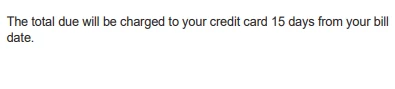
If it shows that auto pay is there, then yes it is active and around 15 days after your bill date, Koodo will attempt to make the withdrawal


  • Author
  • Advisor
  • November 29, 2025

If it shows that auto pay is there, then yes it is active and around 15 days after your bill date, Koodo will attempt to make the withdrawal

I just transferred from Freedom to Koodo my bill on Freedom used to be 26th of every month but the auto pay is deducted on the 7th of the following month

So what does that mean 


Forum|alt.badge.img+4
  • Mobile Master
  • November 29, 2025

What does what mean? What Dennis said is that of auto pay shows as active, it should work; Koodo usually pulls around 15 days after your bill date. Your old Freedom billing cycle doesn’t matter now; Koodo’s auto pay follows their own schedule. If it’s set up and confirmed, you’re good. If the payment doesn’t go through by then, check your account or reply here. 

https://www.koodomobile.com/en/help/setting-pre-authorized-payments?srsltid=AfmBOoo_mY3P8Sugzvie6CQSFohlt3NkgN8rP7uHoU767l8Cc1wDyJaV


Forum|alt.badge.img+4
  • Mobile Master
  • November 29, 2025

When you get your koodo bill, please login to your self serve account and download your detailed pdf ebill.  On the bottom of the first page if will say one of the following